
Post Date: May 10, 2019
Last Updated: October 21, 2026
Introduction
This guide explains how to install openstack-utils and fix the openstack-status command not found error on CentOS 7.6. The openstack-status command shows an overall view of your OpenStack services, but it isn’t available until you add the package that provides it.
-bash: openstack-status: command not found
The openstack-utils package isn’t installed by default, which is why that error appears. Besides openstack-status, it also provides openstack-config and openstack-service, covered below.
Note: CentOS 7 reached end-of-life in June 2024. OpenStack’s install guide lists RDO packages for CentOS 7 only up to the Train release, with no maintained releases on CentOS 7. RDO’s own project page also reports that no new RPM releases have been published after Epoxy (2025.1), with an effort under way to resume them. These steps are for maintaining an existing RPM-based deployment. For anything new, check RDO for the current state first.
Prerequisites
Before you install the openstack-utils package, make sure you have:
- A CentOS 7.6 server running OpenStack from RPM packages
- Root or sudo access
- Your OpenStack admin credentials file, if you want the full output from
openstack-status
Architecture
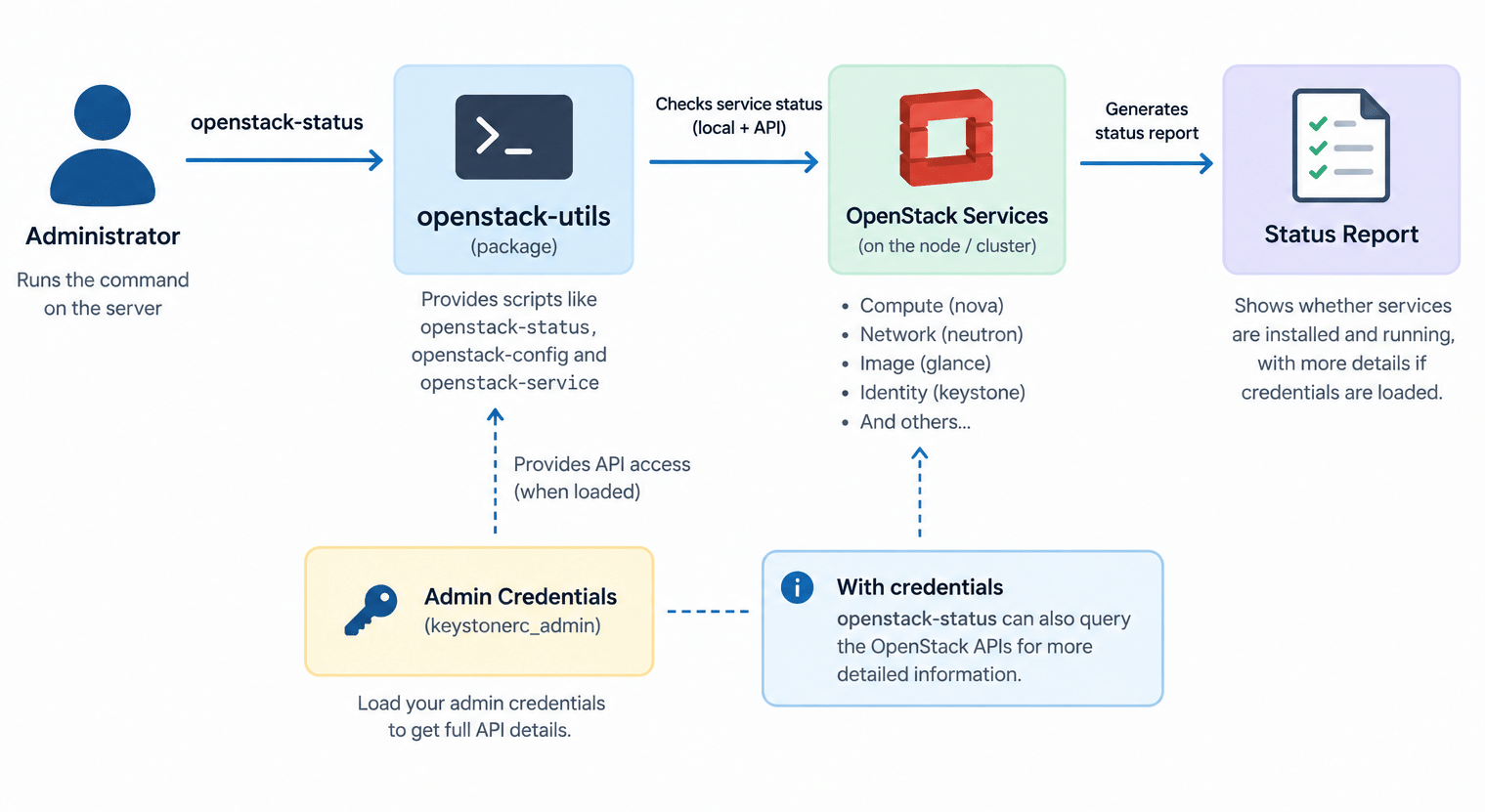
- The openstack-utils package is a small set of shell scripts placed in
/usr/bin. It isn’t a service and runs only when you call it openstack-statuschecks which OpenStack packages and services exist on the node you run it on, and whether each service is running- When your admin credentials are loaded, it can also ask the OpenStack APIs for more details, so the output covers more than the local machine
- The package comes from the OpenStack (RDO) repositories, not from CentOS’s base repositories, so that repository must be enabled before
yumcan find it
The image below shows how the openstack-utils package fits in, from the command you type to the status report you read. See OpenStack’s guide to RDO packages for CentOS for how the repository is set up.
Steps to Install the openstack-utils Package
1. Confirm the Error
openstack-status
If the package is missing, you’ll see the command not found message above.
2. Enable the OpenStack Repository
The openstack-utils package is provided through the OpenStack (RDO) repository. If your server was deployed from RDO, it’s probably enabled already. Check:
yum repolist | grep -i openstack
If nothing is listed, install the repository package that matches the OpenStack release you run. You can list what’s available:
yum list available "centos-release-openstack-*"
Then install the one for your release, for example:
sudo yum install -y centos-release-openstack-<release>
Replace <release> with your release name (for example rocky, stein, or train).
If
yumcan’t reach its mirrors at all, that’s most likely because CentOS 7 is end-of-life and its standard repositories have moved to the CentOS vault archive. You’ll need to pointyumat that archive first.
3. Install openstack-utils
This installs the openstack-utils package and its scripts:
sudo yum install -y openstack-utils
4. Load Your Admin Credentials
For the full report, load your admin credentials into the shell first. The file name depends on how OpenStack was deployed. Deployments made with Packstack create keystonerc_admin:
source ~/keystonerc_admin
Without credentials, openstack-status may show only the local service status and warn that they aren’t loaded.
5. Check OpenStack Services Status
sudo openstack-status
You’ll get a report grouped by service, showing whether each one is active.
Using the Other openstack-utils Tools
The openstack-utils package includes more than openstack-status:
openstack-service starts, stops, restarts, and lists OpenStack services in one command:
sudo openstack-service status
sudo openstack-service restart nova
openstack-config reads and changes values in OpenStack’s .conf files without opening an editor:
sudo openstack-config --get /etc/nova/nova.conf DEFAULT my_ip
sudo openstack-config --set /etc/nova/nova.conf vnc server_proxyclient_address 192.168.1.5
Back up a config file before changing it, and restart the affected service afterward for the change to apply.
Still Seeing openstack-status Command Not Found?
If you still get the openstack-status command not found error after installing, check these:
- The install failed. Re-run
sudo yum install -y openstack-utilsand read the output for errors - The repository isn’t enabled. If
yumreports no package available, go back to Step 2 - You’re on a different node. The package must be installed on the machine where you run the command
- A very limited
PATHinsudo. Runrpm -ql openstack-utils | grep statusto find the exact path, then run it by full path
Conclusion
The openstack-status command not found error just means the openstack-utils package isn’t installed. To install openstack-utils, enable the OpenStack (RDO) repository first, then run yum install openstack-utils, load your admin credentials, and run openstack-status. Keep in mind that CentOS 7 and its RPM-based OpenStack releases are end-of-life, so treat this as maintenance for an existing deployment.
Frequently Asked Questions
Is the openstack-utils package installed by default? No. It isn’t part of a default CentOS install, and it isn’t always installed by OpenStack deployment tools either, which is why the command is missing until you add it.
Does the openstack-utils package work on containerized OpenStack deployments? Generally it reports on services installed from packages on the host. On container-based deployments such as Kolla, it may show little or nothing, so use that platform’s own tools instead.
Why does openstack-status show only some of the information? Your admin credentials probably aren’t loaded in the shell. Source your admin credentials file and run it again.
Can I install openstack-utils without enabling the OpenStack repository? Not from CentOS’s base repositories. The package is provided through the OpenStack (RDO) repositories, so enable one first.
Related Articles
How to Install single node OpenStack on CentOS 7.6
Failed to connect to server VNC console in Openstack
Talk to Our Technology Experts
Running or migrating an OpenStack cloud? Our team can help with OpenStack deployment, service monitoring and troubleshooting, and ongoing cloud infrastructure support.