
Post Date: April 04, 2026
Last Updated: November 03, 2026
Introduction
Trivy is an open-source vulnerability scanner designed to identify security risks in container images, filesystems, Git repositories, and Infrastructure as Code (IaC). It helps DevOps engineers and system administrators detect known vulnerabilities (CVEs), security misconfigurations, exposed secrets, and other potential security threats.
Install Trivy on Ubuntu to integrate vulnerability scanning into your development environments and CI/CD pipelines. By regularly scanning container images, application dependencies, and infrastructure configurations, teams can identify security issues early and reduce potential risks before deployment.
In this guide, we will explain how to install Trivy on Ubuntu using the official APT repository. You will also learn how to configure the GPG key, install the required dependencies, verify the installation, and perform basic vulnerability scans.
Implementation
I. Prerequisites for Trivy Installation on Ubuntu
Before starting the Trivy installation on Ubuntu, ensure that your system meets the following requirements:
- Ubuntu or Debian-based Linux distribution.
- Root or sudo privileges.
- Internet connectivity to access the official Trivy repository.
wgetandgnupgpackages.- APT package manager.
II. How Trivy Works in a DevOps Pipeline
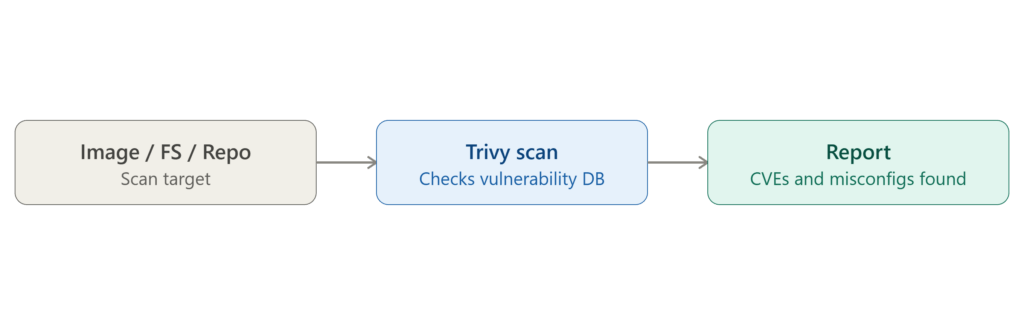
Trivy helps improve application and infrastructure security by scanning different targets and identifying potential vulnerabilities.
The Trivy vulnerability scanning process involves the following steps:
- Target Selection: Trivy scans a container image, filesystem directory, or Git repository.
- Vulnerability Detection: It checks the target against vulnerability databases to identify known security issues.
- Security Analysis: It detects CVEs, configuration issues, and exposed secrets.
- Report Generation: Trivy generates a report containing identified vulnerabilities and security findings.
This process helps DevOps teams identify security issues early and integrate automated security checks into CI/CD workflows.
III. Install Required Dependencies
First, update the Ubuntu package repository and install the required dependencies.
Run the following commands:
sudo apt-get update

sudo apt-get install -y wget gnupg
These packages provide the following functionality:
- wget: Downloads files from remote servers.
- gnupg: Verifies repository signing keys.
IV. Add the Trivy GPG Key
To securely install Trivy from its official repository, add the Aqua Security GPG signing key.
Execute the following command:
wget -qO - https://aquasecurity.github.io/trivy-repo/deb/public.key | gpg --dearmor | sudo tee /usr/share/keyrings/trivy.gpg > /dev/null
This command downloads the official Trivy public key and converts it into a GPG keyring file.
Note: The older apt-key add method is deprecated. Using a dedicated keyring with the signed-by option restricts repository authentication to the specified signing key.
V. Add the Official Trivy APT Repository
After configuring the GPG key, add the official Trivy repository to your Ubuntu system.
Run the following command:
echo "deb [signed-by=/usr/share/keyrings/trivy.gpg] https://aquasecurity.github.io/trivy-repo/deb generic main" | sudo tee /etc/apt/sources.list.d/trivy.list
The signed-by option instructs APT to verify packages from the Trivy repository using the specified GPG keyring.
This provides repository-specific key verification instead of relying on globally trusted repository keys.
VI. Install Trivy on Ubuntu
Once the official repository has been configured, update the package index and install Trivy.
Execute the following commands:
sudo apt-get update

sudo apt-get install -y trivy
APT downloads and installs the Trivy vulnerability scanner and its required packages.
VII. Verify the Trivy Installation
After completing the installation, verify whether Trivy is installed successfully.
Run:
trivy --version
The command displays the installed Trivy version.
If the version information appears without errors, the Trivy installation is successful.
VIII. Perform a Basic Vulnerability Scan Using Trivy
After installing Trivy on Ubuntu, you can start scanning container images, filesystems, and Git repositories for security vulnerabilities.
1. Scan a Docker Image
To scan a container image, execute:
trivy image nginx:latest
This command scans the Nginx container image and identifies known vulnerabilities in its operating system packages and application dependencies.
The scan report provides information about detected vulnerabilities, including their severity levels.
2. Scan a Filesystem
To scan a project directory or filesystem, execute:
trivy fs .
This command scans the current directory for vulnerabilities and supported security findings.
It helps identify security issues in application dependencies and configuration files.
3. Scan a Git Repository
To scan a local Git repository, execute:
trivy repo .
You can also scan a remote Git repository using its URL:
trivy repo https://github.com/aquasecurity/trivy-ci-test
This helps identify vulnerabilities, misconfigurations, and exposed secrets in supported repository files and dependencies.
IX. Conclusion: Benefits of Trivy Installation on Ubuntu
Installing Trivy on Ubuntu is a straightforward process that helps strengthen security across container images, filesystems, and Git repositories. By configuring the official Trivy APT repository and using a dedicated GPG keyring, administrators can install and maintain the vulnerability scanner without relying on the deprecated apt-key method.
After completing the Trivy installation on Ubuntu, you can use commands such as trivy image, trivy fs, and trivy repo to identify known vulnerabilities and other security issues in your applications and infrastructure.
Integrating Trivy into DevOps and CI/CD pipelines enables continuous security scanning, early vulnerability detection, and improved container security. Regularly updating vulnerability databases and scanning application components helps organizations maintain a more secure development and deployment environment.
Frequently Asked Questions (FAQs)
1. What is Trivy used for in Ubuntu?
Trivy is an open-source vulnerability scanner used to identify security vulnerabilities, misconfigurations, and exposed secrets in container images, filesystems, Git repositories, and Infrastructure as Code.
2. How do I install Trivy on Ubuntu?
You can install Trivy on Ubuntu by adding the official Aqua Security APT repository, configuring its GPG signing key, updating the package index, and executing sudo apt-get install -y trivy.
3. Can Trivy scan private container registries?
Yes. Trivy supports scanning private container images using registry authentication credentials, including credentials configured through standard Docker authentication mechanisms.
4. Does Trivy require internet access to scan images?
Trivy requires internet access to download and update its vulnerability database. However, it can perform scans using a previously downloaded and cached database when offline, provided the required database is available.
5. Can Trivy be integrated into CI/CD pipelines?
Yes. Trivy can be integrated into CI/CD tools such as Jenkins and GitLab CI to automatically scan container images, dependencies, and source code during the build and deployment process.
Related Articles
- How to Renew Kubernetes Certificates Using kubeadm (Step-by-Step Guide with Zero Planned Downtime)
- How to Configure cert-manager ClusterIssuer with Cloudflare API Token on Kubernetes
Strengthen Your Application Security with Our Experts
Looking to strengthen your application and container security? Pheonix Solutions provides expert DevOps, cloud infrastructure, and security solutions to help businesses identify vulnerabilities and improve their deployment environments.
With tools like Trivy vulnerability scanner, businesses can detect security vulnerabilities in container images, filesystems, Git repositories, and application dependencies. Our DevOps team can help you integrate automated vulnerability scanning into your CI/CD pipelines and implement effective security practices.
Explore our DevOps and Cloud Services to learn more about our solutions.
Need help with Trivy installation, container security, or DevSecOps implementation? Contact our experts to discuss your requirements.