
Post Date: December 12, 2019
Last Updated: November 8, 2026
Introduction
The JavaScript shift and unshift methods are commonly used to remove and add elements at the beginning of an array. These methods help developers manage array elements dynamically and modify existing arrays without creating new ones.
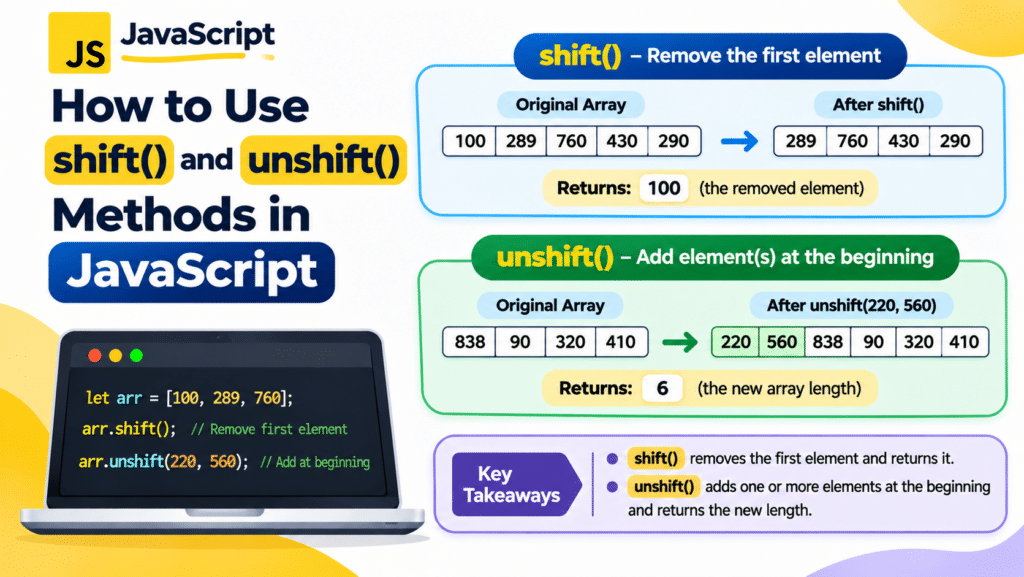
The shift() method removes the first element from an array and returns the removed value, whereas the unshift() method adds one or more elements at the beginning and returns the updated array length.
In this article, we will explore how to use JavaScript shift() and unshift() methods with simple examples and understand their differences.
1. JavaScript shift() Method
The JavaScript shift() method removes the first element from an array and returns the removed element.
It also changes the original array by removing the first element.
Syntax
array.shift();
Example 1: Using the shift() Method
Let’s create an array and remove its first element using the shift() method.
var arr = [100, 289, 760, 430, 290];

var value = arr.shift();

console.log(value);
console.log(arr);
Output:
100
[289, 760, 430, 290]
Explanation:
- The
arrvariable contains five elements. - The
shift()method removes the first element, which is100. - The removed element is stored in the
valuevariable. - The updated array contains the remaining four elements.
Example 2: Using shift() on an Empty Array
If the array is empty, the shift() method returns undefined because there is no element to remove.
Example:
var arr = [];

var value = arr.shift();

console.log(value);
console.log(arr);
Output:
undefined
[]
Explanation:
- The array is empty.
- The
shift()method does not find any element to remove. - It returns
undefined. - The original array remains empty.
2. JavaScript unshift() Method
The JavaScript unshift() method adds one or more elements to the beginning of an array.
It modifies the original array and returns the new length of the array.
Syntax
array.unshift(element1, element2, ...);
You can pass one or multiple elements as arguments.
Example 3: Using the unshift() Method
Let’s create an array and add two new elements at the beginning using the unshift() method.
Example:
var arr = [838, 90, 320, 410];

console.log(arr.unshift(220, 560));

console.log(arr);
Output:
6
[220, 560, 838, 90, 320, 410]
Explanation:
- The original array contains four elements.
- The
unshift()method adds220and560at the beginning. - The method returns
6, which is the new length of the array. - The updated array contains six elements.
3. Difference Between shift() and unshift() in JavaScript
Both methods modify the original array, but they perform different operations.
| Feature | shift() | unshift() |
|---|---|---|
| Purpose | Removes the first element | Adds elements at the beginning |
| Arguments | Does not require arguments | Accepts one or more elements |
| Return value | Removed element | New array length |
| Original array | Modified | Modified |
| Empty array | Returns undefined | Adds elements if provided |
4. Practical Example: Using shift() and unshift() Together
You can use both methods to remove and add elements at the beginning of the same array.
Example:
var fruits = ["Apple", "Banana", "Orange"];

var removedFruit = fruits.shift();

console.log("Removed Fruit:", removedFruit);
console.log("Updated Array:", fruits);

var newLength = fruits.unshift("Mango", "Grapes");

console.log("New Array Length:", newLength);
console.log("Final Array:", fruits);
Output:
Removed Fruit: Apple
Updated Array: ["Banana", "Orange"]
New Array Length: 4
Final Array: ["Mango", "Grapes", "Banana", "Orange"]
Explanation:
First, the shift() method removes Apple from the beginning of the array. Next, the unshift() method adds Mango and Grapes to the beginning of the updated array.
This example demonstrates how both methods can be used to manage array elements dynamically.
Conclusion
The JavaScript shift() and unshift() methods are useful for managing elements at the beginning of an array.
The shift() method removes the first element and returns the removed value, whereas the unshift() method adds one or more elements at the beginning and returns the updated array length.
Understanding these methods helps developers perform array operations efficiently when building JavaScript applications.
FAQs
1. What is the use of the shift() method in JavaScript?
The shift() method removes the first element from an array and returns the removed element. It also modifies the original array.
2. What is the use of the unshift() method in JavaScript?
The unshift() method adds one or more elements to the beginning of an array and returns the new length of the array.
3. What does shift() return when an array is empty?
When the array is empty, the shift() method returns undefined because there is no element to remove.
4. Can we add multiple elements using the unshift() method?
Yes. The unshift() method accepts multiple arguments and adds all the specified elements to the beginning of the array.
5. Do shift() and unshift() modify the original array?
Yes. Both methods modify the original array. The shift() method removes the first element, while the unshift() method adds elements at the beginning.
Related Articles
Official Documentation
Talk to Our Experts
Looking for reliable JavaScript development and web application solutions?
Pheonix Solutions provides web development, application development, cloud solutions, and DevOps services to help businesses build efficient and scalable digital solutions.
Our experts can help you develop interactive web applications, implement modern JavaScript functionality, and improve your application performance.
Contact our experts to discuss your project requirements.
Thank you for choosing Pheonix Solutions!