
Post Date: December 19, 2019
Last Updated: November 10, 2026
Introduction
Software applications often contain multiple objects that need to communicate and perform specific operations. As applications grow, managing these interactions can become complicated, resulting in tightly coupled code, maintenance challenges, and reduced scalability.
This is where software design patterns become useful.
Design patterns are reusable solutions to commonly occurring software design problems. They provide structured approaches to organizing code, improving maintainability, and making applications easier to extend.
In this article, we will explore the Command Design Pattern in JavaScript, understand how it works, and implement it using a simple example of switching a light on and off.
What Is a Software Design Pattern?
A software design pattern is a reusable approach to solving a common problem in software development. It is not a complete solution or a piece of code that can simply be copied into every project. Instead, it provides a proven structure that developers can adapt to their requirements.
Design patterns are commonly grouped into three categories:
- Creational Patterns: Focus on object creation, such as Singleton, Factory Method, and Builder.
- Structural Patterns: Focus on how classes and objects are organized, such as Adapter, Decorator, and Facade.
- Behavioral Patterns: Focus on communication and responsibilities between objects, such as Command, Observer, and Strategy.
Choosing the right design pattern can help developers create flexible and maintainable applications.
What Is the Command Design Pattern?
The Command Design Pattern is a behavioral design pattern that converts a request or operation into a standalone object.
Instead of directly calling a method on an object, the application creates a command object that contains the operation to be performed.
This approach separates the object that requests an action from the object that actually performs it.
The Command Pattern typically involves four components:
- Command: Defines an interface or convention for executing an operation.
- Concrete Command: Implements the operation and connects it to the receiver.
- Receiver: Performs the actual business operation.
- Invoker: Triggers the command without needing to understand its internal implementation.
This pattern is particularly useful when implementing action queues, undo and redo functionality, task scheduling, and event-driven operations.
How to Implement the Command Design Pattern in JavaScript
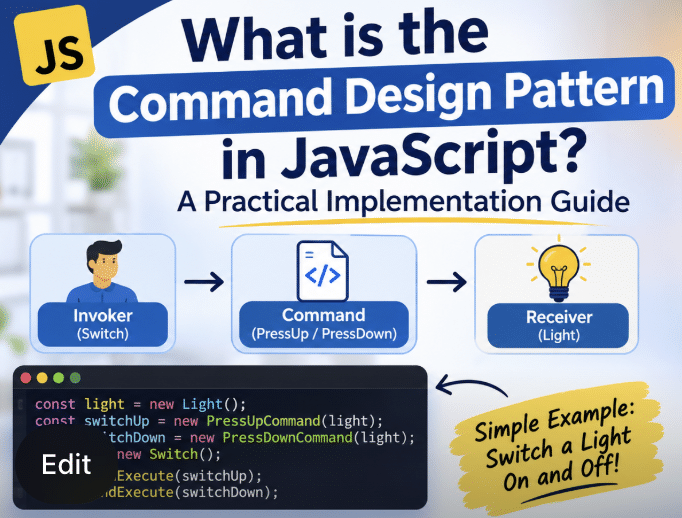
Let’s understand the implementation using a simple example: switching a light on and off.
Step 1: Create the Invoker Class
The Switch class acts as the invoker. It stores the commands and executes them when requested.
class Switch {
    constructor() {
        this.commands = [];
    }

    storeAndExecute(command) {
        this.commands.push(command);
        command.execute();
    }
}
Here:
commandsstores the executed command objects.storeAndExecute()saves the command and invokes itsexecute()method.
Step 2: Create the Receiver Class
The Light class acts as the receiver. It contains the actual operations for switching the light on and off.
class Light {
    turnOn() {
        console.log("Light is ON");
    }

    turnOff() {
        console.log("Light is OFF");
    }
}
The receiver does not need to know how the commands are triggered.
Step 3: Create the Concrete Command Classes
Now, create two command classes: PressUpCommand and PressDownCommand.
Each command receives a Light object through its constructor and executes the corresponding operation.
Command to switch the light on:
class PressUpCommand {
    constructor(light) {
        this.light = light;
    }

    execute() {
        this.light.turnOn();
    }
}
Command to switch the light off:
class PressDownCommand {
    constructor(light) {
        this.light = light;
    }

    execute() {
        this.light.turnOff();
    }
}
Both classes follow the same execute() method convention. This allows the invoker to execute different commands without knowing their specific implementations.
Step 4: Create Objects and Execute the Commands
Finally, create the required objects and execute the commands.
const light = new Light();

const switchUp = new PressUpCommand(light);
const switchDown = new PressDownCommand(light);

const lightSwitch = new Switch();

lightSwitch.storeAndExecute(switchUp);
lightSwitch.storeAndExecute(switchDown);
Expected output:
Light is ON
Light is OFF
The Switch class does not directly call turnOn() or turnOff(). It simply executes the command objects.
This demonstrates how the Command Pattern separates the invoker from the receiver.
How Does the Command Pattern Work?
The execution flow can be understood as follows:
- The application creates a
Lightreceiver object. - Concrete command objects receive the
Lightobject. - The
Switchinvoker receives the command objects. - The invoker calls the
execute()method. - The command delegates the operation to the
Lightreceiver. - The receiver performs the requested operation.
This separation makes it easier to introduce additional commands without modifying the invoker.
Advantages of the Command Design Pattern
The Command Pattern provides several benefits:
- Loose Coupling: Separates the object requesting an operation from the object performing it.
- Extensibility: New commands can be introduced without changing the invoker.
- Action History: Commands can be stored for logging, auditing, or tracking operations.
- Undo and Redo: Commands can be extended with additional methods to reverse or repeat operations.
- Flexible Execution: Commands can be queued, scheduled, or executed later.
When Should You Use the Command Pattern?
Consider using the Command Pattern when:
- You need to separate user actions from business logic.
- Your application requires undo and redo functionality.
- Operations need to be stored or executed later.
- You need to maintain a queue of tasks or requests.
- Different actions must be triggered through a common interface.
However, avoid introducing design patterns unnecessarily. For a simple operation, a direct method call may be easier to understand and maintain.
Conclusion
Software design patterns provide reusable approaches to common software development challenges. The Command Design Pattern is particularly useful when you need to separate the request for an operation from its execution.
Using JavaScript classes, we implemented a simple light-switch example to demonstrate how the invoker, concrete commands, and receiver work together.
Understanding design patterns and knowing when to apply them can help developers write cleaner, more flexible, and maintainable code.
If you are learning software architecture, explore other behavioral, creational, and structural patterns to understand how they can be applied to real-world development projects.
Frequently Asked Questions
1. What is the Command Design Pattern in JavaScript?
The Command Design Pattern is a behavioral pattern that encapsulates an operation inside an object. It separates the object requesting an action from the object performing it.
2. What are the main components of the Command Pattern?
The four main components are Command, Concrete Command, Receiver, and Invoker. Each component has a separate responsibility in executing an operation.
3. What are the advantages of the Command Pattern?
It provides loose coupling, extensibility, action history, and support for implementing undo and redo functionality.
4. Where is the Command Pattern used?
It is commonly used in GUI applications, task queues, transaction processing, automation systems, and applications that require undo and redo operations.
5. Is the Command Pattern suitable for every application?
No. It is useful when operations need to be encapsulated, queued, or tracked. For simple operations, direct method calls may be more appropriate.
Related Articles
Need Assistance?
Need help with software architecture, JavaScript development, or implementing scalable application solutions?
The Pheonix Solutions technical team can assist with software development, application architecture, and technology implementation.
For assistance, contact us.