
Post Date: June 21, 2019
Last Updated: October 26, 2026
Introduction
Transfer files using SCP is a secure and efficient method of copying files and directories between Linux servers over SSH. SCP (Secure Copy Protocol) encrypts data during transmission and allows system administrators to transfer files using a simple command-line interface. In this guide, we will explain how to transfer files using SCP, copy directories recursively, and specify a custom SSH port with practical examples.
Prerequisites
- Source and destination server IP addresses or hostnames.
- Valid SSH login credentials for the destination server.
- SCP utility installed on the source server.
- SSH access enabled on the destination server.
- Appropriate permissions to access the source files and write to the destination directory.
- The SSH port number of the destination server (default: 22).
Implementation : How to Transfer Files Using SCP
Steps
1)Basic format of scp is
scp source_file username@destination_host:destination_folder
2) Normally, to copy all the files in a directory using the -r option, in recursively copies the contents of source files.
scp -r/root/truefriend.txt root@1x2.xxx.147.xx:/root/rakesh/
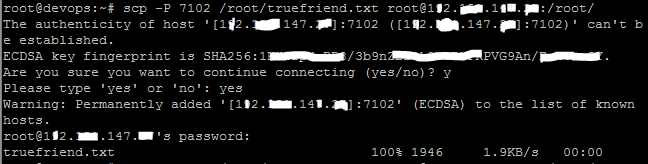
3) If there is no default port(22) then use -P option
scp -P 7102 /root/truefriend.txt root@1×2.xxx.147.xx:/root/rakesh/
On Destination server.
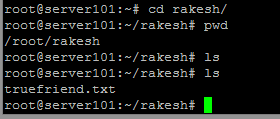
Finally you able to find the file on another server.
Conclusion
SCP provides a simple and secure way to transfer files and directories between servers using the command line. By specifying the source file, destination server details, and the appropriate options, administrators can transfer data securely. The -r option allows recursive directory transfers, while the -P option specifies a non-default SSH port.
For detailed information about transferring files between servers using SCP, including command syntax, recursive directory transfers, and custom SSH port configuration, refer to the official Documentation Link.
For more SCP commands, Linux server administration, secure file transfer troubleshooting, and server management tutorials, visit pheonixsolutions.com.
FAQs
1. What is SCP in Linux?
SCP (Secure Copy Protocol) is a command-line utility used to securely transfer files and directories between servers over SSH.
2. Which port does SCP use by default?
SCP uses SSH, which typically operates on port 22 by default. If the destination server uses a different SSH port, specify it using the -P option.
3. How do I transfer a file from one server to another using SCP?
Use the following command to copy a file to a destination server:
scp /path/to/source_file username@destination_host:/path/to/destination/
Related Articles
File Transfer Using WinSCP: A Step-by-Step Guide
How to Copy Files Between Servers Using a Bash Script?
Need Help with Secure File Transfers Between Servers?
Need help with SCP configuration, transferring files between Linux servers, or troubleshooting file transfer errors? Our experts can assist with secure file transfers, SSH configuration, server administration, Linux commands, and other technical requirements. Get in touch with our team here.