
Post Date: February 20, 2020
Last Updated: November 11, 2026
Introduction
JavaScript arrays are one of the most commonly used data structures in web development. They allow developers to store, organize, and manipulate multiple values within a single variable. Whether you are building a simple website or a complex web application, understanding JavaScript array methods can help you write cleaner, more efficient, and maintainable code.
JavaScript provides several built-in array methods that simplify common programming tasks such as transforming data, filtering elements, calculating totals, and managing collections.
Instead of writing lengthy for loops or forEach() functions, developers can use powerful methods such as map(), filter(), and reduce() to perform operations with less code.
These methods are particularly useful when working with API responses, processing JSON data, managing application state, and developing modern JavaScript applications.
In this tutorial, we will explore JavaScript arrays and their most useful built-in methods, including their syntax, working principles, practical examples, and differences.
What You Will Learn
- What arrays are in JavaScript
- How to create and access JavaScript arrays
- How the JavaScript
map()method works - How to filter array elements using
filter() - How to perform calculations using
reduce() - Differences between
map(),filter(), andreduce() - Other useful JavaScript array methods
- Best practices for working with JavaScript arrays
What Is an Array in JavaScript?
An array in JavaScript is a data structure used to store multiple values in a single variable.
Unlike ordinary variables that hold one value, arrays allow developers to manage collections of values such as numbers, strings, objects, and even other arrays.
Example: Creating a JavaScript Array
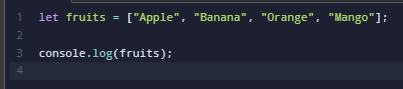
Output:

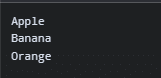
Each element in a JavaScript array has an index, starting from 0.
Accessing Array Elements
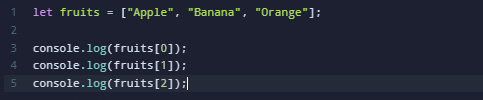
Output:
JavaScript arrays can also contain different data types.
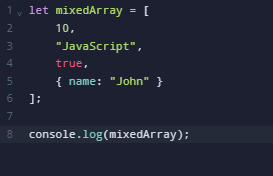
This flexibility makes JavaScript arrays useful for handling different types of application data.
JavaScript map() Method
The JavaScript map() method is used to transform each element of an array and create a new array containing the transformed values.
The map() method executes a callback function for every existing element in the original array.
It does not modify the original array directly.
Syntax
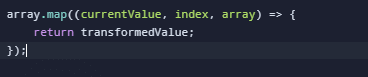
Parameters:
currentValue: The current element being processed.index: The index of the current element.array: The original array on whichmap()was called.
The callback’s returned value becomes the corresponding element in the new array.
Example 1: Converting a One-Dimensional Array into a Two-Dimensional Array
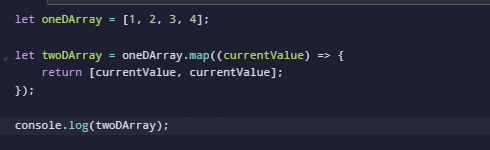
Output:

Explanation:
The map() method iterates through each element of the original array.
For every element, it creates a new array containing the same value twice.
The result is a two-dimensional array.
Example 2: Multiplying Array Elements
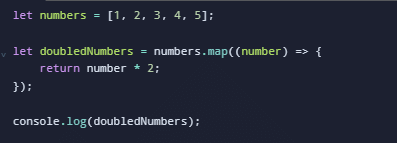
Output:
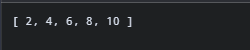
Here, every number is multiplied by two.
Example 3: Extracting Values from an Array of Objects
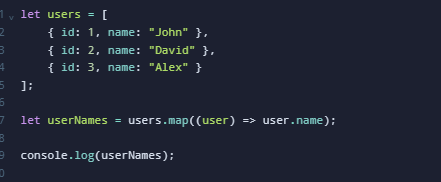
Output:

This approach is commonly used when processing API responses and JSON data.
Important Note: The map() method returns a new array with the same length as the original array. If the callback does not return a value, the corresponding result will be undefined.
JavaScript filter() Method
The JavaScript filter() method creates a new array containing only the elements that satisfy a specified condition.
Unlike map(), which transforms elements, filter() determines which elements should be included in the resulting array.
Syntax

The callback should return a truthy or falsy value.
If the result is truthy, the element is included in the new array.
If the result is falsy, the element is excluded.
Example 1: Filtering Even Numbers
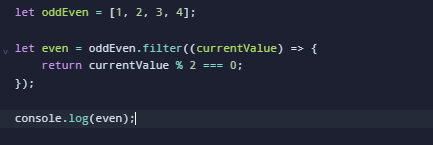
Output:

Explanation:
The modulus operator % returns the remainder after division.
If a number divided by two produces a remainder of zero, it is an even number.
The filter() method includes only those numbers that satisfy this condition.
Example 2: Filtering Numbers Greater Than 50
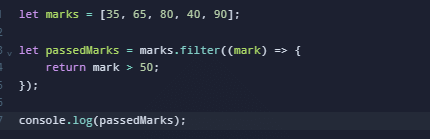
Output:

Example 3: Filtering Active Users
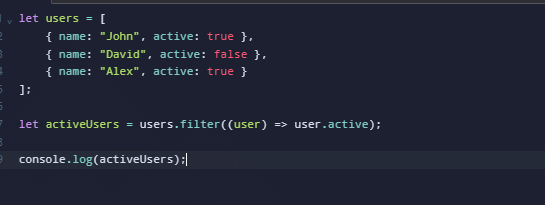
Output:

This method is useful for filtering user records, product lists, search results, and other collections.
Important Note: The filter() method returns a new array. Its length may be smaller than or equal to the original array length, depending on how many elements satisfy the condition.JavaScript reduce() Method
The JavaScript reduce() method processes array elements and combines them into a single accumulated result.
Unlike map() and filter(), the reduce() method can return different data types, including numbers, strings, arrays, and objects.
It is commonly used for calculating totals, counting occurrences, grouping data, and transforming collections.
Syntax
array.reduce((accumulator, currentValue) => {
    return updatedAccumulator;
}, initialValue);
Parameters:
accumulator: Stores the accumulated result from previous iterations.currentValue: Represents the current array element.initialValue: Specifies the starting value for the accumulator.
Example 1: Calculating the Sum of Array Elements
let ones = [1, 1, 1, 1, 1, 1];

let sum = ones.reduce((prev, next) => {
    return prev + next;
}, 100);

console.log(sum);
Output:
106
Explanation:
The initial accumulator value is 100.
Each array element is added to the accumulator.
| Iteration | Accumulator Before | Current Value | Result |
|---|---|---|---|
| 1 | 100 | 1 | 101 |
| 2 | 101 | 1 | 102 |
| 3 | 102 | 1 | 103 |
| 4 | 103 | 1 | 104 |
| 5 | 104 | 1 | 105 |
| 6 | 105 | 1 | 106 |
The final accumulated value is 106.
Example 2: Calculating the Total Price
let prices = [100, 200, 300, 400];

let total = prices.reduce((sum, price) => {
    return sum + price;
}, 0);

console.log(total);
Output:
1000
This approach is useful in shopping carts, billing systems, and financial applications.
Example 3: Finding the Maximum Value
let numbers = [10, 50, 20, 80, 40];

let maximum = numbers.reduce((max, number) => {
    return number > max ? number : max;
});

console.log(maximum);
Output:
80
Example 4: Counting Repeated Values
let fruits = [
    "Apple",
    "Banana",
    "Apple",
    "Orange",
    "Banana",
    "Apple"
];

let count = fruits.reduce((acc, fruit) => {
    acc[fruit] = (acc[fruit] || 0) + 1;
    return acc;
}, {});

console.log(count);
Output:
{
    Apple: 3,
    Banana: 2,
    Orange: 1
}
This technique is useful for data analysis and counting occurrences.
Important Note: If initialValue is not provided, JavaScript uses the first existing array element as the initial accumulator and starts processing subsequent elements. Calling reduce() on an empty array without an initial value throws a TypeError.
5. Difference Between map(), filter(), and reduce()
Although these methods process arrays, each serves a different purpose.
| Feature | map() | filter() | reduce() |
|---|---|---|---|
| Purpose | Transform elements | Select elements | Accumulate results |
| Return type | New array | New array | Any data type |
| Array length | Same length | Same or smaller | Not applicable |
| Original array | Not directly modified | Not directly modified | Not directly modified |
| Common use | Data transformation | Data filtering | Totals and aggregation |
Practical Example
Consider the following array:
let numbers = [1, 2, 3, 4, 5];
Using map():
let doubled = numbers.map(num => num * 2);

console.log(doubled);
Output:
[2, 4, 6, 8, 10]
Using filter():
let even = numbers.filter(num => num % 2 === 0);

console.log(even);
Output:
[2, 4]
Using reduce():
let total = numbers.reduce((sum, num) => sum + num, 0);

console.log(total);
Output:
15
These examples demonstrate how the same array can be processed differently depending on the required operation.
6. Other Useful JavaScript Array Methods
In addition to map(), filter(), and reduce(), JavaScript provides several other built-in methods.
6.1 JavaScript slice() Method
The slice() method extracts a portion of an array without modifying the original array.
let numbers = [10, 20, 30, 40, 50];

let result = numbers.slice(1, 4);

console.log(result);
Output:
[20, 30, 40]
The ending index is excluded from the result.
6.2 JavaScript splice() Method
The splice() method adds, removes, or replaces elements in an existing array.
let fruits = ["Apple", "Banana", "Orange"];

fruits.splice(1, 1);

console.log(fruits);
Output:
["Apple", "Orange"]
Unlike slice(), the splice() method modifies the original array.
6.3 JavaScript find() Method
The find() method returns the first element that satisfies a condition.
let numbers = [10, 20, 30, 40];

let result = numbers.find(num => num > 25);

console.log(result);
Output:
30
If no element matches the condition, the method returns undefined.
6.4 JavaScript includes() Method
The includes() method checks whether an array contains a specified value.
let fruits = ["Apple", "Banana", "Orange"];

console.log(fruits.includes("Banana"));
Output:
true
6.5 JavaScript reduceRight() Method
The reduceRight() method works similarly to reduce(), but processes elements from right to left.
let words = ["JavaScript", "is", "Powerful"];

let result = words.reduceRight((acc, word) => {
    return acc + " " + word;
});

console.log(result);
Output:
Powerful is JavaScript
This method is useful when the order of accumulation matters.
Combining JavaScript Array Methods
One of the most powerful features of JavaScript arrays is the ability to chain multiple methods together.
For example, you can use filter(), map(), and reduce() to process data in a single expression.
Example: Calculate the Total of Even Numbers After Doubling Them
let numbers = [1, 2, 3, 4, 5, 6];

let result = numbers
    .filter(num => num % 2 === 0)
    .map(num => num * 2)
    .reduce((sum, num) => sum + num, 0);

console.log(result);
Output:
24
How It Works:
filter()selects even numbers:[2, 4, 6].map()doubles the selected numbers:[4, 8, 12].reduce()calculates the total:24.
This approach improves code readability and helps developers express complex operations clearly.
However, chaining multiple array methods can create intermediate arrays. For performance-sensitive applications with very large datasets, consider whether a single loop or reduce() operation would be more efficient.
Best Practices for Using JavaScript Array Methods
Following best practices helps developers write reliable and maintainable JavaScript code.
- Use map() for transformations: Choose
map()when you need to transform every element and produce a new array. - Use filter() for conditional selection: Use
filter()when you want to retain only elements that satisfy a condition. - Use reduce() for aggregation: Choose
reduce()when combining multiple elements into one result. - Avoid unnecessary mutations: Prefer non-mutating methods when working with shared application state.
- Provide an initial value for reduce(): This makes the behavior more predictable, especially when processing empty arrays.
- Use meaningful variable names: Names such as
totalPrice,activeUsers, andfilteredProductsmake code easier to understand. - Keep callback functions simple: Avoid unnecessarily complex logic inside array callbacks.
Understanding these practices can improve code quality and reduce debugging time.
Conclusion
JavaScript arrays are essential for storing and managing collections of data in modern web applications. Understanding built-in JavaScript array methods allows developers to write cleaner, more readable, and maintainable code.
The map() method simplifies data transformation, while filter() helps select elements based on specific conditions. The reduce() method provides a flexible approach to aggregating values and performing complex calculations.
Other methods such as slice(), splice(), find(), includes(), and reduceRight() offer additional capabilities for handling arrays efficiently.
By practicing these methods with real-world examples, developers can improve their JavaScript programming skills and reduce the need for complicated loops.
Whether you are a beginner learning JavaScript or an experienced developer working on complex applications, mastering these array methods will help you build better and more efficient solutions.
For additional learning, explore the official MDN JavaScript Array Documentation and JavaScript.info.
Frequently Asked Questions (FAQs)
What are JavaScript array methods?
JavaScript array methods are built-in functions used to manipulate, transform, search, filter, and process array elements. Common examples include map(), filter(), reduce(), slice(), splice(), and find().
What is the difference between map() and filter() in JavaScript?
The map() method transforms each array element and returns a new array with the same length. The filter() method selects only elements that satisfy a condition, so the returned array may contain fewer elements.
What is the purpose of reduce() in JavaScript?
The reduce() method combines array elements into an accumulated result. It is commonly used to calculate sums, find maximum values, count occurrences, and group data.
Do JavaScript array methods modify the original array?
It depends on the method. Methods such as map(), filter(), reduce(), and slice() do not directly modify the original array. Methods such as splice(), push(), pop(), and sort() modify the original array. Callback functions can still cause mutations if they explicitly change referenced objects or arrays.
Which JavaScript array method should beginners learn first?
Beginners should start with map(), filter(), and reduce() because these methods cover three essential operations: transforming, filtering, and aggregating data. Learning these methods provides a strong foundation for modern JavaScript development.
Related Articles
How to use shift and unshift method in javascript
How to remove & install oracle java [Jdk] in ubuntu 16.0.4
Need Help with JavaScript Development?
Are you looking for professional assistance with JavaScript development, frontend optimization, web application development, or troubleshooting complex JavaScript issues?
Our development team at Pheonix Solutions can help you build, maintain, and optimize modern web applications using reliable development practices.
Get in touch with our team here to discuss your web development requirements.
Great content! Super high-quality! Keep it up! 🙂