
Post Date: February 24, 2025
Last Updated: November 02, 2026
Introduction
Embed Apache Superset Dashboard in React to integrate interactive business intelligence, data visualization, and analytics directly into your web application. Apache Superset is an open-source business intelligence (BI) platform that enables users to explore data, create interactive dashboards, and generate meaningful insights.
In this guide, we will explain how to embed an Apache Superset dashboard in a React application using the Superset Embedded SDK and secure guest-token authentication. You will learn how to enable dashboard embedding, configure Cross-Origin Resource Sharing (CORS), generate guest tokens through a backend API, and integrate interactive dashboards into your React application.
Additionally, we will demonstrate how to implement Row-Level Security (RLS) to restrict dashboard data based on individual user permissions. This ensures that users can access only the information they are authorized to view.
By the end of this tutorial, you will understand the complete dashboard embedding process and how to build a secure, user-specific analytics experience.
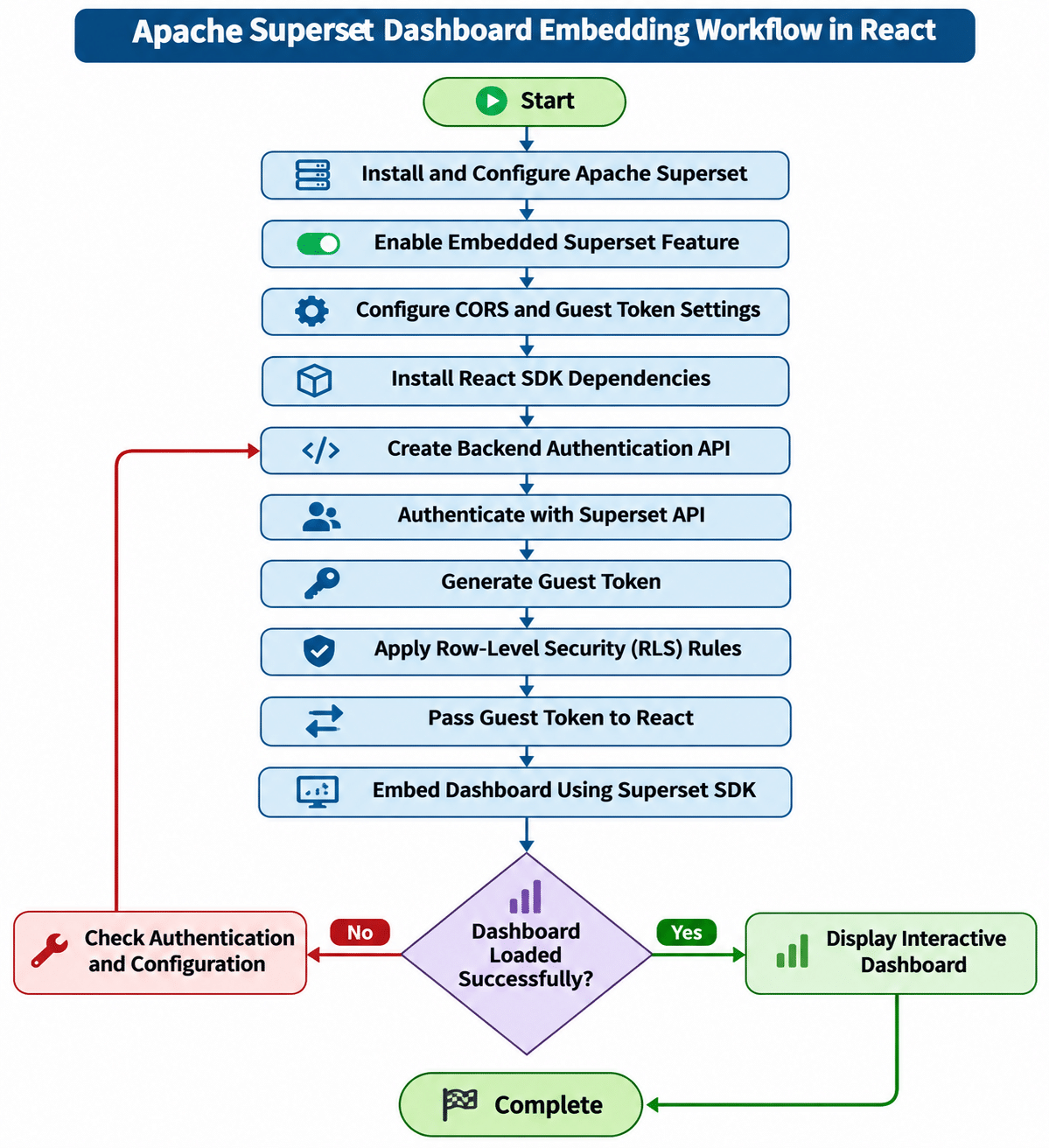
Apache Superset Dashboard Embedding Workflow
The following flowchart illustrates the overall process of embedding an Apache Superset dashboard into a React application.
Prerequisites
Before starting the Apache Superset dashboard embedding process, ensure that you have the following:
- Apache Superset installed and running.
- A configured Superset user with the required dashboard and guest-token permissions.
- A dashboard available in Apache Superset.
- Dashboard embedding enabled in Superset.
- A React frontend application.
- A backend application capable of communicating with the Superset API.
- Access to configure Superset settings and generate a secure guest-token secret.
Implementation
Step 1: Enable Embedding in Apache Superset
To embed an Apache Superset dashboard into an external application, you first need to enable the embedded dashboard feature.
Open the Superset configuration file (superset_config.py) and add the following settings:
# Enable the embedded Superset feature
FEATURE_FLAGS = {
    "EMBEDDED_SUPERSET": True
}

# Enable Cross-Origin Resource Sharing (CORS)
ENABLE_CORS = True

CORS_OPTIONS = {
    "supports_credentials": True,
    "allow_headers": ["*"],
    "expose_headers": ["*"],
    "resources": ["*"],
    "origins": ["http://localhost:3000"]
}

# Dashboard embedding configuration
GUEST_ROLE_NAME = "Gamma"

# Replace with a securely generated secret
GUEST_TOKEN_JWT_SECRET = "PASTE_GENERATED_SECRET_HERE"

GUEST_TOKEN_JWT_ALGO = "HS256"

GUEST_TOKEN_HEADER_NAME = "X-GuestToken"

# Guest token expiration time: 5 minutes
GUEST_TOKEN_JWT_EXP_SECONDS = 300
Configuration explanation:
FEATURE_FLAGS: Enables the embedded Superset functionality.ENABLE_CORS: Allows requests from the configured frontend origin.CORS_OPTIONS: Defines the frontend origins and permitted cross-origin request settings.GUEST_ROLE_NAME: Specifies the role assigned to guest users.GUEST_TOKEN_JWT_SECRET: Defines the secret used for guest-token signing.GUEST_TOKEN_JWT_ALGO: Specifies the JWT signing algorithm.GUEST_TOKEN_EXP_SECONDS: Controls the guest-token expiration period through the configured setting.
Note: Replace http://localhost:3000 with your actual frontend domain. Use a strong, unique secret and never expose it in frontend code or public repositories. Restrict CORS origins to trusted domains in production.
After updating the configuration, restart the Superset application to apply the changes.
Step 2: Install Dependencies in React
Next, install the required packages in your React application.
Using npm:
npm install --save @superset-ui/embedded-sdk axios
Alternatively, using Yarn:
yarn add @superset-ui/embedded-sdk axios
Package explanation:
@superset-ui/embedded-sdk: Provides the functionality required to embed Superset dashboards into React applications.axios: Helps communicate with backend APIs to retrieve guest tokens.
Step 3: Generate an Authentication Token Through the Backend
To securely embed a Superset dashboard, you need to generate a guest token using the Superset Security API.
This process should be handled by your backend rather than directly inside the React application.
The authentication process involves two main operations:
- Authenticate with the Superset API and obtain an access token.
- Use the access token to generate a guest token for the required dashboard.
Create a backend function to generate the guest token.
Example backend TypeScript code:
import axios from "axios";

const supersetUrl = "http://YOUR_DASHBOARD_URL_HERE";

const supersetApiUrl = `${supersetUrl}/api/v1/security`;

const dashboardId = "EMBED_ID_HERE";

export const getSupersetGuestToken = async (): Promise<string> => {
    // Step 1: Authenticate with Superset
    const loginBody = {
        username: process.env.SUPERSET_USERNAME,
        password: process.env.SUPERSET_PASSWORD,
        provider: "db",
        refresh: true,
    };

    const loginResponse = await axios.post(
        `${supersetApiUrl}/login`,
        loginBody,
        {
            headers: {
                "Content-Type": "application/json",
            },
        }
    );

    const accessToken = loginResponse.data.access_token;

    // Step 2: Prepare the guest-token request
    const guestTokenBody = {
        resources: [
            {
                type: "dashboard",
                id: dashboardId,
            },
        ],
        rls: [],
        user: {
            username: "report-viewer",
            first_name: "report-viewer",
            last_name: "report-viewer",
        },
    };

    // Step 3: Generate the guest token
    const guestTokenResponse = await axios.post(
        `${supersetApiUrl}/guest_token/`,
        guestTokenBody,
        {
            headers: {
                "Content-Type": "application/json",
                Authorization: `Bearer ${accessToken}`,
            },
        }
    );

    return guestTokenResponse.data.token;
};
Important configuration details:
- Replace
YOUR_DASHBOARD_URL_HEREwith your Superset server URL. - Replace
EMBED_ID_HEREwith the actual embedded dashboard UUID. - Store the Superset username and password in backend environment variables.
- Use a dedicated Superset service account with only the permissions required to generate guest tokens for authorized dashboards.
- Do not return the Superset access token to the React frontend.
Expose this function through a protected backend API endpoint. The React application should call that endpoint to retrieve the guest token.
Step 4: Implement Row-Level Security (RLS)
Row-Level Security (RLS) is used to restrict the data displayed in a dashboard based on user-specific permissions.
For example, consider an application where users belong to different business regions:
- North region users should see only North region data.
- South region users should see only South region data.
- East region users should see only East region data.
Instead of displaying the entire dataset to every user, you can apply RLS rules when generating the guest token.
Example RLS configuration:
const guestTokenBody = {
    resources: [
        {
            type: "dashboard",
            id: dashboardId,
        },
    ],
    rls: [
        {
            dataset: 1,
            clause: "region = 'North'",
        },
    ],
    user: {
        username: "report-viewer",
        first_name: "report-viewer",
        last_name: "report-viewer",
    },
};
In this example:
dataset: Represents the Superset dataset ID.clause: Defines the SQL filter applied to the dataset.region = 'North': Restricts the dashboard data to the North region.
Note: The dataset ID and RLS clause are illustrative. Replace them with your actual dataset ID and the appropriate filter for your application. Determine the permitted region from authenticated backend user information, not from an untrusted frontend request. Configure the corresponding dataset permissions and validate the RLS behavior before deployment.
Step 5: Embed the Superset Dashboard in React
After generating the guest token through the backend, integrate the Superset Embedded SDK into your React application.
First, create a React component that retrieves the guest token from your backend API and embeds the dashboard.
Example React code:
import React, { useEffect } from "react";
import axios from "axios";
import { embedDashboard } from "@superset-ui/embedded-sdk";

const AdminDashboard: React.FC = () => {

    const supersetUrl = "http://YOUR_DASHBOARD_URL_HERE";

    const dashboardId = "EMBED_ID_HERE";

    useEffect(() => {

        const embedSupersetDashboard = async () => {

            try {

                // Step 1: Request guest token from backend
                const response = await axios.get(
                    "/api/superset/guest-token"
                );

                const guestToken = response.data.token;

                if (!guestToken) {
                    console.error("Failed to retrieve guest token.");
                    return;
                }

                // Step 2: Get the dashboard container
                const container = document.getElementById(
                    "superset-container"
                );

                if (!container) {
                    console.error("Superset container not found.");
                    return;
                }

                // Step 3: Embed the Superset dashboard
                await embedDashboard({
                    id: dashboardId,
                    supersetDomain: supersetUrl,
                    mountPoint: container,

                    fetchGuestToken: async () => guestToken,

                    dashboardUiConfig: {
                        hideTitle: true,
                    },
                });

            } catch (error) {

                console.error(
                    "Error embedding Superset dashboard:",
                    error
                );

            }
        };

        embedSupersetDashboard();

    }, []);

    return (
        <div
            style={{
                display: "flex",
                width: "100%",
                height: "100vh",
                backgroundColor: "#f3f3f4",
            }}
        >
            <div
                id="superset-container"
                style={{
                    width: "100%",
                    height: "100%",
                }}
            />
        </div>
    );
};

export default AdminDashboard;
Code explanation:
embedDashboard: Initializes the Superset Embedded SDK.supersetDomain: Specifies the Superset server URL.mountPoint: Identifies the HTML element where the dashboard will be displayed.fetchGuestToken: Supplies the guest token required for dashboard authentication.dashboardUiConfig: Controls the dashboard user interface, such as hiding the dashboard title.
The React application retrieves the guest token from the backend API and uses it to authenticate the embedded dashboard.
Note: The backend endpoint /api/superset/guest-token is an example route. Implement it in your backend, protect it with your application’s authentication and authorization checks, and ensure the dashboard ID is authorized for the requesting user.
Step 6: Verify the Embedded Dashboard
After completing the configuration and React integration, run your application and verify that the dashboard loads successfully.
Perform the following checks:
- Confirm that Apache Superset is running.
- Verify that the embedded dashboard is enabled.
- Check that the configured frontend origin is allowed by CORS.
- Confirm that the backend successfully authenticates with Superset.
- Verify that the guest token is generated successfully.
- Ensure that the React application receives the guest token.
- Confirm that the dashboard is displayed correctly.
- Test whether Row-Level Security restricts data as expected.
If the dashboard does not load, inspect the browser console, backend logs, and Superset API responses to identify authentication, configuration, or permission-related issues.
Guest Token Authentication and RLS Workflow
The following flowchart explains how guest-token authentication and Row-Level Security work together when a user accesses an embedded Superset dashboard.
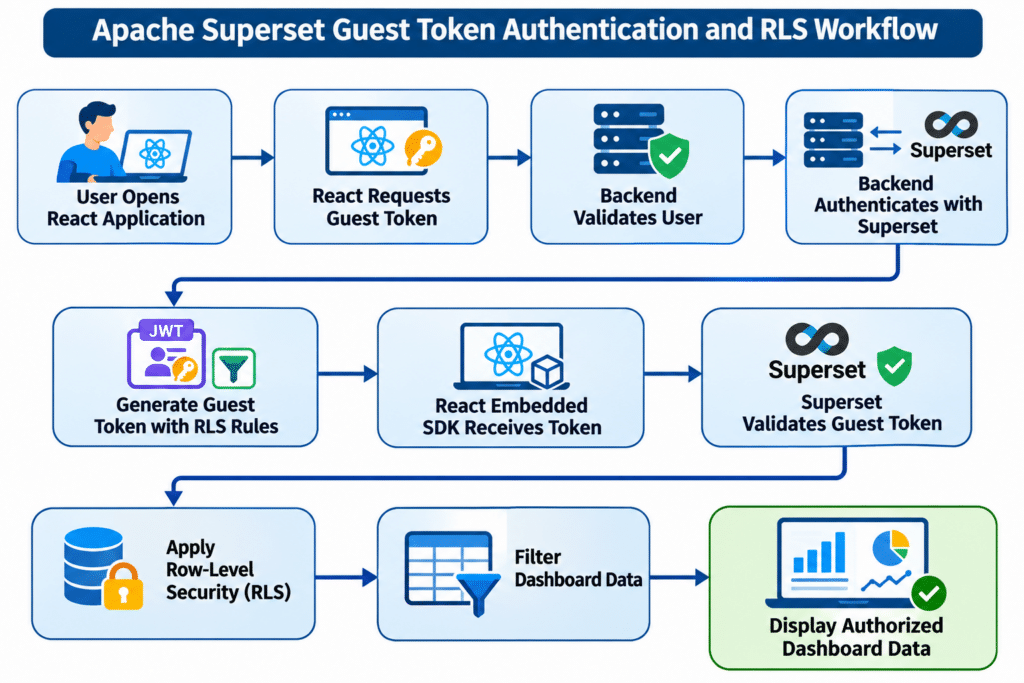
This workflow ensures that authentication and access-control operations are handled securely while users interact with the embedded dashboard.
Security Best Practices
When embedding Apache Superset dashboards into a React application, follow these security recommendations:
- Protect Superset credentials: Never expose Superset usernames, passwords, or JWT secrets in frontend code.
- Use backend authentication: Generate guest tokens through a protected backend API.
- Configure CORS properly: Allow only trusted frontend domains in production.
- Apply Row-Level Security: Restrict dashboard data according to authenticated user permissions.
- Use HTTPS: Secure communication between React, the backend, and Superset.
- Set appropriate token expiration: Use short-lived guest tokens and implement token renewal when necessary.
- Restrict dashboard access: Grant only the required dashboard and dataset permissions to guest users.
- Validate user permissions: Ensure that users cannot request guest tokens for dashboards or datasets they are not authorized to access.
Following these practices helps maintain a secure dashboard integration.
Conclusion
Embedding Apache Superset dashboards into a React application provides an effective way to deliver interactive business intelligence reports and data analytics within an existing web platform.
In this tutorial, we covered the complete process of embedding an Apache Superset dashboard in React, including enabling the embedded dashboard feature, configuring CORS, installing the Embedded SDK, generating guest tokens through a backend API, and integrating dashboards into React.
We also explored how Row-Level Security (RLS) helps restrict dashboard data based on individual user permissions, ensuring that users can access only the information they are authorized to view.
By combining the Superset Embedded SDK, secure guest-token authentication, and RLS, businesses can build scalable and secure analytics solutions while providing users with a seamless dashboard experience.
Frequently Asked Questions (FAQs)
1. How do I embed an Apache Superset dashboard in React?
You can embed an Apache Superset dashboard in React using the @superset-ui/embedded-sdk package. Generate a guest token through your backend and pass it to the SDK using the fetchGuestToken callback.
2. How does guest-token authentication work in Apache Superset?
Guest-token authentication allows external applications to access authorized embedded dashboards without exposing Superset login credentials. The backend authenticates with Superset and generates a guest token for the dashboard.
3. What is Row-Level Security (RLS) in Apache Superset?
Row-Level Security is an access-control mechanism that restricts the data users can view. For example, users assigned to the North region can access only North region records.
4. Why should guest tokens be generated on the backend?
Guest tokens should be generated on the backend to protect Superset credentials and signing secrets. This prevents sensitive authentication information from being exposed in browser-side JavaScript.
5. What is the Apache Superset Embedded SDK?
The Apache Superset Embedded SDK is a JavaScript package that allows developers to integrate interactive Superset dashboards into external applications such as React websites and web portals.
6. Can I restrict dashboard access for different users?
Yes. You can use guest-token resource permissions and Row-Level Security rules to control which dashboards and data users can access.
Related Articles
Apache Superset – Managing Filter Options and Edit Chart Permission
Get Expert DevOps & Cloud Support
Looking for reliable DevOps, cloud computing, or infrastructure management solutions for your business? Pheonix Solutions offers expert technology services to help businesses improve infrastructure performance, security, scalability, and operational efficiency.
Explore our DevOps and Cloud Services to learn more about our solutions.
Need assistance with your requirements? Contact our experts to discuss how we can help your business.