

Post Date: April 30, 2020
Last Updated: November 10, 2026
Introduction
Apache is one of the most widely used open-source web servers for hosting websites. Apache Virtual Hosts allow you to host multiple websites or domains on a single Ubuntu server, with each website having its own configuration, document root, and content.In this tutorial, we will walk you through the process of configuring Apache Virtual Hosts on Ubuntu 16.04. You will learn how to create website directories, configure permissions, set up virtual host configuration files, enable the websites, and verify that the configuration is working correctly.
Prerequisites
Before proceeding with this tutorial, ensure that you have the following:
- A server running Ubuntu 16.04.
- Apache web server installed on the server.
- A user account with sudo privileges.
- A registered domain name (e.g.,
example.com). - DNS records (A records) pointing your domain name to the server’s IP address.
- Basic knowledge of Linux commands and Apache configuration.
Implementation
1:Create the Directory Structure
The first step that we are going to take is to make a directory structure that will hold the site data.
sudo mkdir -p /var/www/example.com/public_html
2:Grant Permissions
Now we have the directory structure for our files, but they are owned by our root user. If we want our regular user to be able to modify files in our web directories, we can change the ownership by doing this,
sudo chown -R $www-data2:$www-data/var/www/example.com/public_html
We should also modify our permissions a little bit to ensure that read access is permitted to the general web directory and all of the files and folders it contains so that pages can be served correctly.
sudo chmod -R 755 /var/www/example.com
3:Create Demo Pages for Each Virtual Host
We can open up an index.html file in our editor by typing,
nano /var/www/example.com/public_html/index.html
In this file, create a simple HTML document that indicates the site it is connected to. The file looks like,
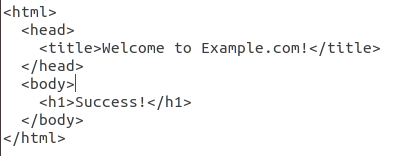
Save and close the file.
4:Create New Virtual Host Files
Apache comes with a default virtual host file called 000-default.conf. Start copying the file for our domain.
sudo cp /etc/apache2/sites-available/000-default.conf /etc/apache2/sites-available/example.com.conf
Open the new file in editor with root privileges,
sudo nano /etc/apache2/sites-available/example.com.conf
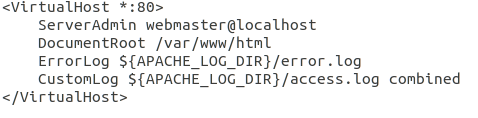
First, we need to change the ServerAdmin directive to an email that the site administrator can receive emails through.
ServerAdmin admin@example.com
After that we need to add servername and server alias name.
ServerName example.com
ServerAlias www.example.com
Then, we need to change the document root path as,
DocumentRoot /var/www/example.com/public_html
The file looks like,
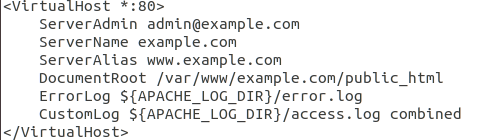
Save and close the file.
5:Enable the New Virtual Host Files
We need to enable our site using a2ensite by,
sudo a2ensite example.com.conf
Then, we need disable 000-default.conf file by,
sudo a2dissite 000-default.conf
We need to verify syntax before restarting apache,
apachectl -t
After that, we need to restart apache,
sudo systemctl restart apache2
or,
sudo service apache2 restart
6:Test your Results
We need to go to this page http://example.com.
The result page looks like,
Success!
You have successfully created virtual hosting.
CONCLUSION
In this tutorial, we have successfully configured an Apache Virtual Host on Ubuntu 16.04. We covered creating the website directory, setting the appropriate permissions, creating a sample web page, configuring the virtual host file, and enabling the site.
Apache Virtual Hosts make it easier to manage and host multiple websites on a single server while maintaining separate configurations and document roots. You can follow the same process to add additional domains to your Ubuntu server.
By following these steps, you can efficiently manage multiple websites using Apache Virtual Hosting.
FAQs
1. What is Apache Virtual Hosting?
Apache Virtual Hosting is a feature that allows you to host multiple websites or domain names on a single Apache web server. Each website can have its own document root and configuration.
2. What are the prerequisites for configuring Apache Virtual Hosts on Ubuntu 16.04?
You need an Ubuntu 16.04 server, Apache web server, a user account with sudo privileges, a registered domain name, and DNS records pointing to your server’s IP address.
3. Where are Apache Virtual Host configuration files stored in Ubuntu 16.04?
Apache Virtual Host configuration files are stored in the /etc/apache2/sites-available/ directory. Enabled virtual hosts are linked to the /etc/apache2/sites-enabled/ directory.
Related Articles
How to Configure Multiple Domains Using Virtual Hosts on Apache Ubuntu
Official Documentation
Need Help Configuring and Managing Apache Web Servers?
Looking to host multiple websites on a single server or configure Apache Virtual Hosts for your domains?
Pheonix Solutions provides Linux server administration, Apache web server configuration, cloud hosting, website migration, server management, and infrastructure support services.
Our team can help you configure Apache Virtual Hosts, manage multiple domains, troubleshoot web server issues, optimize server performance, and maintain your hosting environment securely.
Get in touch with our team to discuss your web hosting and server management requirements.