
Post Date: January 31, 2020
Last Updated: November 10, 2026
Introduction
Cookies are an essential part of web development because they help websites remember information about visitors between requests. They are small pieces of data stored in a user’s web browser and can be used to maintain preferences, remember user settings, and support certain website functionalities.
In PHP, cookies make it possible to store information on the user’s browser and retrieve it when they visit the website again. For example, a website can use cookies to remember a user’s preferred language, theme, or other non-sensitive preferences.
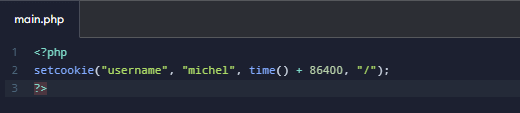
PHP provides a built-in setcookie() function to create cookies. In this guide, we will explain how to set up cookies in PHP, understand the setcookie() syntax, create cookies with expiration dates, retrieve cookie values, and manage cookie settings with practical examples.
1. What Is a Cookie in PHP?
A cookie is a small piece of information stored in the user’s web browser. It allows a website to remember certain information between visits.
For example, cookies can be used for:
- Remembering user preferences.
- Storing language and theme settings.
- Remembering shopping cart information.
- Maintaining certain user preferences between visits.
- Supporting website functionality.
Important: Cookies are stored on the user’s device, not directly in the server database. Avoid storing passwords, authentication secrets, or other sensitive information in plain-text cookies.
2. How to Set Up Cookies in PHP
PHP provides the built-in setcookie() function to create cookies.
The setcookie() function sends a cookie to the user’s browser through an HTTP response header. Therefore, it must be called before sending any HTML content, whitespace, or other output to the browser.
PHP setcookie() Syntax

The modern PHP version also supports an options array, which makes it easier to configure cookie security attributes.
Parameters of the setcookie() Function
| Parameter | Description |
|---|---|
| name | Specifies the cookie name. |
| value | Specifies the value stored in the cookie. |
| expires | Defines when the cookie expires using a Unix timestamp. |
| path | Specifies the server path where the cookie is available. |
| domain | Defines the domain that can access the cookie. |
| secure | When enabled, the cookie is transmitted only over HTTPS. |
| httponly | Prevents JavaScript from accessing the cookie. |
Note: If the expiration time is set to 0 or omitted, the cookie is generally treated as a session cookie and expires when the browser session ends. Manual+1
3. PHP Cookie Creation Example
Let’s create a simple cookie using PHP.
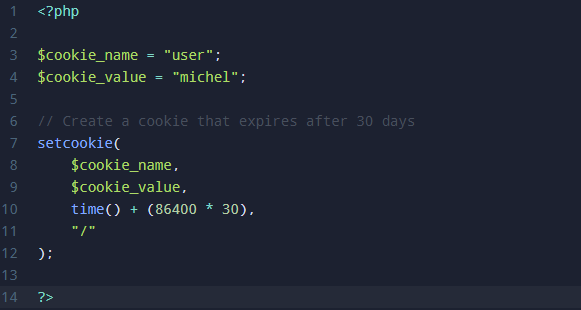
In this example, we will create a cookie named user and store the value michel. The cookie will expire after 30 days.
Example:
Explanation:
$cookie_namedefines the name of the cookie.$cookie_valuestores the value of the cookie.time()returns the current Unix timestamp.86400represents 24 hours in seconds.time() + (86400 * 30)sets the expiration time to 30 days./makes the cookie available throughout the domain.
Important: The cookie will not immediately appear in the $_COOKIE variable during the same request. It becomes available to PHP on the next request when the browser sends it back to the server. Manual+1
4. How to Retrieve Cookies in PHP
After creating a cookie, you can retrieve its value using the PHP $_COOKIE superglobal variable.
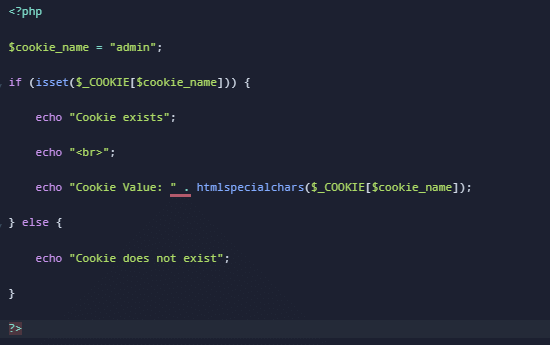
The $_COOKIE variable contains cookies sent by the browser with the current HTTP request.
Example:
Explanation:
$_COOKIEretrieves cookie information sent by the browser.isset()checks whether the specified cookie exists.htmlspecialchars()helps prevent HTML injection when displaying cookie values.- If the cookie is available, the stored value will be displayed.
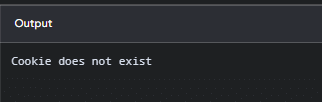
Expected Output:
5. How to Set Cookie Expiration Time in PHP
You can control how long a cookie remains available by configuring its expiration time.
PHP uses the time() function to calculate the expiration timestamp.
Here are some common cookie expiration examples:
| Expiration | PHP Code |
|---|---|
| 1 hour | time() + 3600 |
| 1 day | time() + 86400 |
| 7 days | time() + (86400 * 7) |
| 30 days | time() + (86400 * 30) |
| Session cookie | 0 |
For example, to create a cookie that expires after seven days:
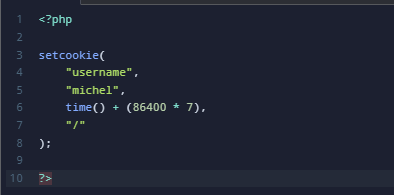
This cookie will remain available until its expiration time, subject to the browser’s cookie policies and user settings.
6. How to Delete a Cookie in PHP
Sometimes, you may need to remove a cookie when a user logs out or when stored preferences are no longer required.
PHP allows you to delete a cookie by setting its expiration time to a timestamp in the past.
Example:
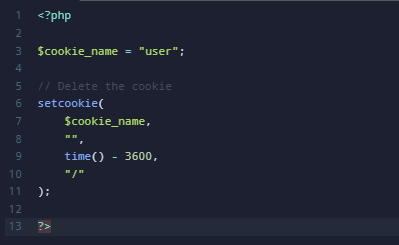
Explanation:
- The cookie name must match the cookie you want to delete.
- The value is set to an empty string.
time() - 3600sets the expiration time in the past.- The path and domain should match the original cookie settings.
After the browser processes the response, the cookie will be removed. Manual+1
7. How to Set Secure Cookies in PHP
Cookie security is important when developing websites that handle user information.
PHP supports additional cookie attributes such as secure, httponly, and samesite.
The following example demonstrates how to create a cookie with security settings.
Example:
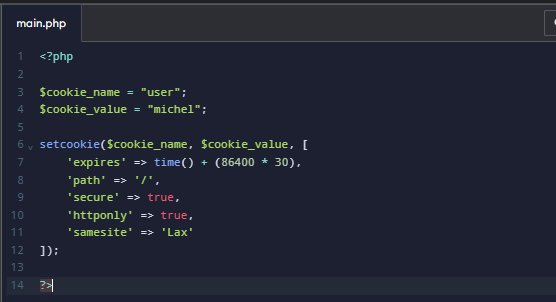
Explanation:
expires: Sets the cookie expiration to 30 days.path: Makes the cookie available throughout the domain.secure: Allows the browser to send the cookie only over HTTPS.httponly: Prevents JavaScript from reading the cookie.samesite: Helps control when cookies are sent with cross-site requests.
Note: Use secure => true on HTTPS websites. If you use SameSite=None, the Secure attribute must also be enabled. Manual+2
8. How to Check Cookies in a Browser
You can verify whether a cookie has been created successfully using your browser’s Developer Tools.
Follow these steps:
- Open your website in Google Chrome.
- Right-click the webpage and select Inspect.
- Navigate to the Application tab.
- Select Cookies from the Storage section.
- Choose your website’s domain.
- Find the cookie name and check its value, expiration date, and security attributes.
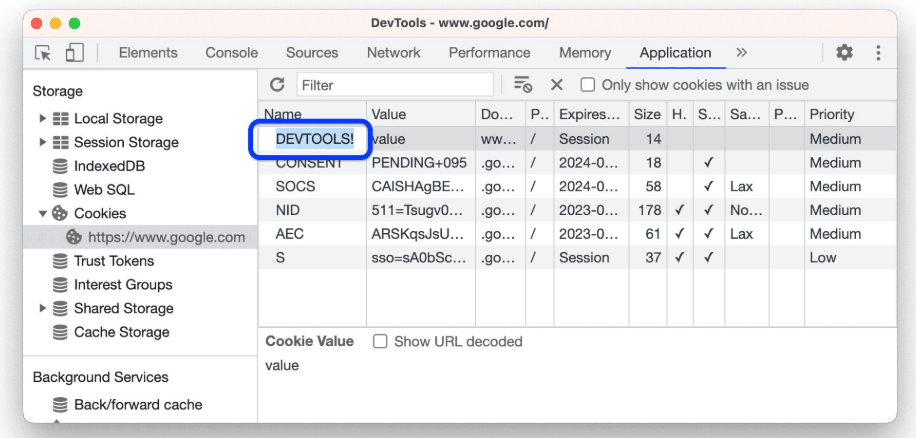
This helps you verify whether your PHP cookie configuration is working correctly.
9. Common Issues When Setting Cookies in PHP
Sometimes cookies may not work as expected. Here are some common issues and their solutions.
| Problem | Solution |
|---|---|
| Cookie is not created | Call setcookie() before sending output. |
| Cookie value is not displayed | Reload the page or make another request. |
| Cookie expires immediately | Check the expiration timestamp. |
| Cookie is not available on another page | Set the path to /. |
| Secure cookie does not work | Make sure the website uses HTTPS. |
| Cookie is not deleted | Use the same path and domain as the original cookie. |
Conclusion
PHP cookies are useful for storing small amounts of information in a user’s browser and maintaining information between website visits. By using the PHP setcookie() function, developers can easily create, retrieve, update, and delete cookies.
Understanding cookie expiration, domain settings, and security attributes such as Secure, HttpOnly, and SameSite helps developers implement cookies more effectively.
Whether you are developing a simple PHP website or a dynamic web application, understanding how to manage cookies in PHP is an important web development skill.
For more information, refer to the official PHP setcookie() documentation.
Frequently Asked Questions (FAQs)
1. How do I create a cookie in PHP?
You can create a cookie using PHP’s built-in setcookie() function. Specify the cookie name, value, and expiration time.
2. How do I retrieve a cookie value in PHP?
Use the $_COOKIE superglobal variable to retrieve a cookie value.

3. How long does a PHP cookie last?
A PHP cookie lasts until its configured expiration time. If the expiration time is set to 0, it is generally a session cookie that expires when the browser session ends.
Related Articles
Need Help with PHP Cookie Setup and Configuration?
Need assistance with PHP cookie implementation, setcookie() configuration, cookie expiration settings, secure cookie handling, or troubleshooting PHP errors? Our technical experts can help with PHP development, website functionality, server configuration, and web application maintenance.
Get in touch with our team here.
Explore our Web Development Services to learn more about our solutions.