

Post Date: January 29, 2020
Last Updated: November 08, 2026
Introduction
This guide explains how to remove the entire mail queue in Exim by resetting the spool directory manually. A stuck or spam-flooded queue can slow down a mail server and delay genuine emails. Clearing it by hand is the fastest fix, and it works on any Linux server running Exim, including cPanel/WHM servers.
The original guide moved the spool folder and recreated it. That still works, but it skipped one important step: stopping Exim first. If Exim keeps running while you move the folder, it can write new messages into a spool that is being replaced. This version adds that step, plus a check to confirm the queue is empty.
Warning: When you remove the entire mail queue, every queued message is deleted, including legitimate ones. Keep the backup folder (
exim.old) until you have confirmed everything works.
Prerequisites
Before you remove the entire mail queue, make sure you have:
- Root or sudo access to the server
- Exim installed and running (default spool path:
/var/spool/exim) - A short maintenance window, because mail delivery pauses briefly
- The correct service name for your system (
exim, orexim4on Debian and Ubuntu)
Architecture
- Exim receives each email and stores it in the spool directory (
/var/spool/exim) until it is delivered - The spool holds three folders:
inputfor message headers and bodies,msglogfor per-message delivery logs, anddbfor retry and hints databases - The
mailuser must own the spool so Exim can read and write to it systemdorSysVinitstops and starts Exim, so no new files are written during the reset- To clear the queue, you stop Exim, rename the old spool as a backup, create a fresh empty spool, fix the ownership, and start Exim again
The image below shows how the manual reset works. For queue-management options beyond this method, see the official Exim documentation.
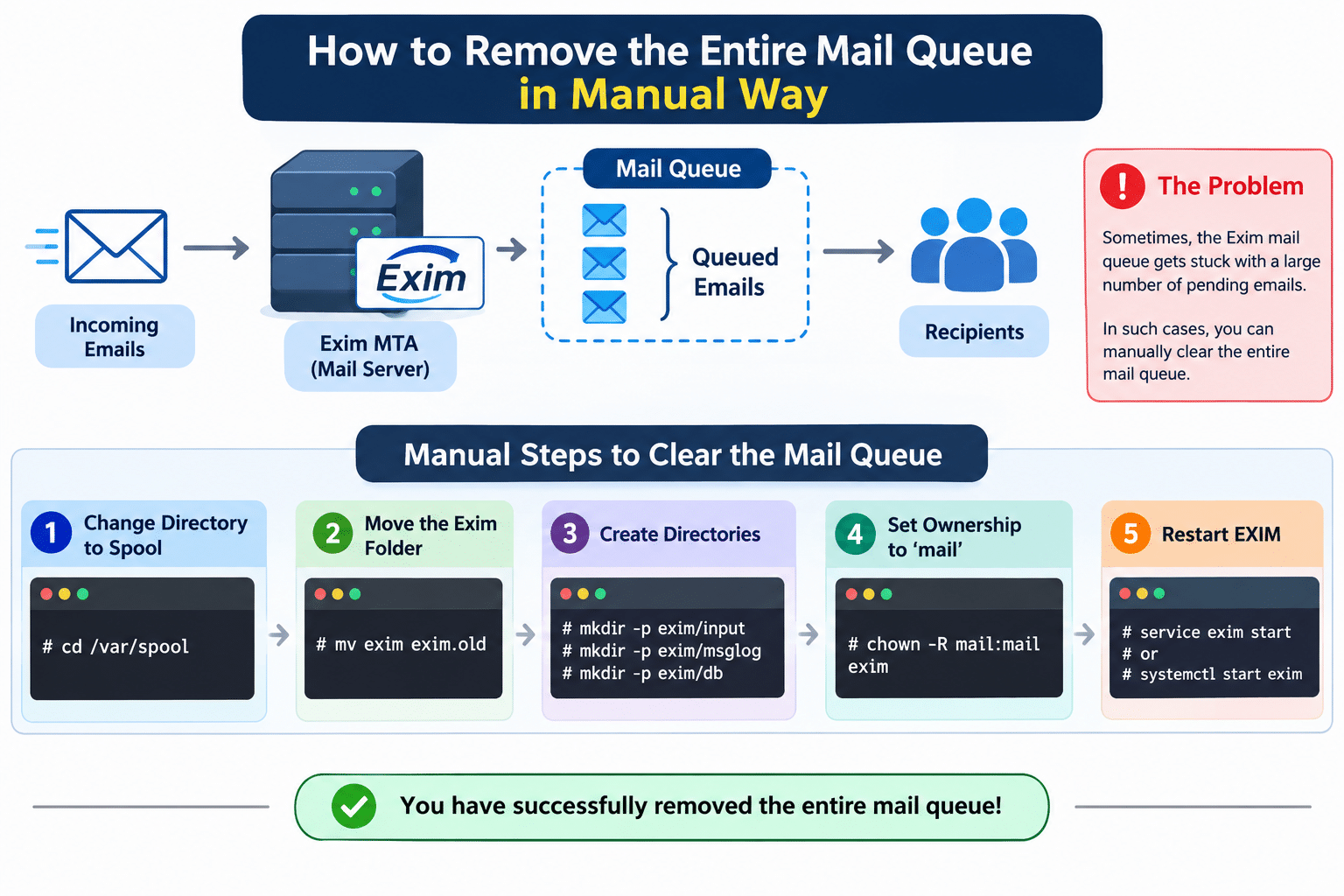
Steps to Remove the Entire Mail Queue
1. Stop Exim
Stopping Exim first prevents new messages from landing in the spool while you move it.
For systemd systems:
systemctl stop exim
For SysVinit systems:
service exim stop
Note: On Debian and Ubuntu, the service name is usually
exim4. The systemctl manual explains the service commands.
2. Change Directory to the Spool
cd /var/spool
3. Move the Old Exim Folder
Renaming the folder is the quickest way to remove the entire mail queue while keeping a backup.
mv exim exim.old
4. Create New Directories for input, msglog and db
mkdir -p exim/input
mkdir -p exim/msglog
mkdir -p exim/db
5. Set Ownership to mail
chown -R mail:mail exim
6. Start Exim and Verify
For systemd systems:
systemctl start exim
For SysVinit systems:
service exim start
Then check that the queue is empty:
exim -bpc
A result of 0 means the queue is cleared. Once you are sure no messages need recovery, delete the backup:
rm -rf /var/spool/exim.old
Note: To delete only specific messages instead of the whole queue, list them with
exim -bpand remove one withexim -Mrm <message-id>.
Troubleshooting
If the queue is not cleared or Exim will not start, check these:
- Exim fails to start: Confirm ownership with
ls -ld /var/spool/eximand repeat Step 5. Check the log at/var/log/exim_mainlog(cPanel/RHEL) or/var/log/exim4/mainlog(Debian) - Queue still shows messages: Exim was probably still running during the move. Stop it fully, repeat the steps, and run
exim -bpcagain - Permission or SELinux errors: On SELinux systems, run
restorecon -R /var/spool/exim - You need the old messages back: Stop Exim, remove the new
eximfolder, and renameexim.oldback toexim - Debian or Ubuntu: The spool path is usually
/var/spool/exim4and the owner isDebian-exim, so adjust the commands - You want to remove the entire mail queue without downtime: This is not possible with this method, because Exim must be stopped. Use
exim -Mrm <message-id>to delete individual messages instead.
Conclusion
Resetting the spool folder is a fast, reliable way to remove the entire mail queue when it is clogged with spam or undeliverable mail. Stop Exim, rename the spool, recreate the three folders, fix the ownership, and start the service again. Keep the exim.old backup until you have confirmed that the server is delivering mail normally.
Frequently Asked Questions
Is it safe to remove the entire mail queue?
Yes, but every queued message is lost, including legitimate emails. Keep exim.old as a backup until you are sure.
Do I need to stop Exim first?
Yes. Stopping it prevents new files from being written to the spool while you move it.
How do I check how many messages are in the queue?
Run exim -bpc for a count, or exim -bp for a full list.
Can I delete only the spam messages?
Yes. Remove individual messages with exim -Mrm <message-id> instead of resetting the whole spool.
Related Articles
After you remove the entire mail queue, these guides cover more Exim commands and ways to test mail delivery.
How to Send an Email Using Telnet from a Remote Server
Talk to Our Technology Experts
Dealing with a clogged mail queue or Exim delivery problems? Our team can help with mail server configuration, spam control, and ongoing monitoring through our Software Maintenance and Support services.
Connect with our technology experts