
Post Date: May 31, 2019
Last Updated: October 25, 2026
Introduction
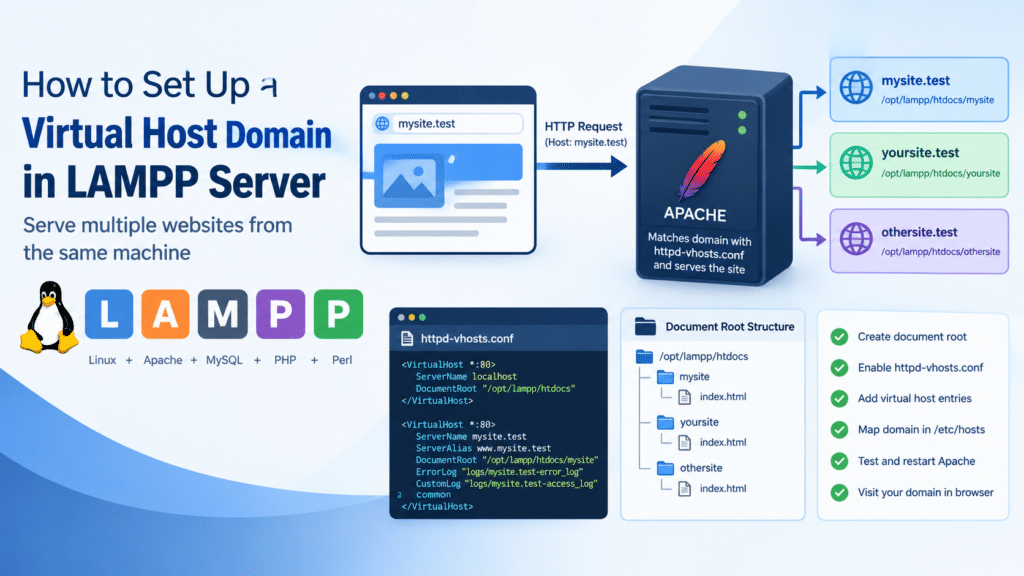
This guide explains how to set up a virtual host domain in LAMPP server, allowing Apache to serve multiple websites from the same machine. Each site can have its own domain name, document root, and log files.
LAMPP is the Linux version of XAMPP, so the same approach can be used when configuring an XAMPP virtual host on Linux. This updated guide covers the complete virtual host domain in LAMPP server setup, including Apache configuration, local domain mapping, testing, and common troubleshooting steps.
Note: XAMPP and LAMPP are intended for development and testing. Apache Friends, the project behind them, says so in its Linux FAQ, and the default settings aren’t hardened for public use. The original guide spoke of serving domains “publicly”. For a public production site, use a regular Apache or LAMP installation instead.
Prerequisites
Before you set up a virtual host domain in LAMPP, make sure you have:
- LAMPP installed in
/opt/lamppand Apache working - Root or sudo access
- A domain name. For local testing, use a made-up name ending in
.test, which is reserved for testing and will never clash with a real website
Architecture
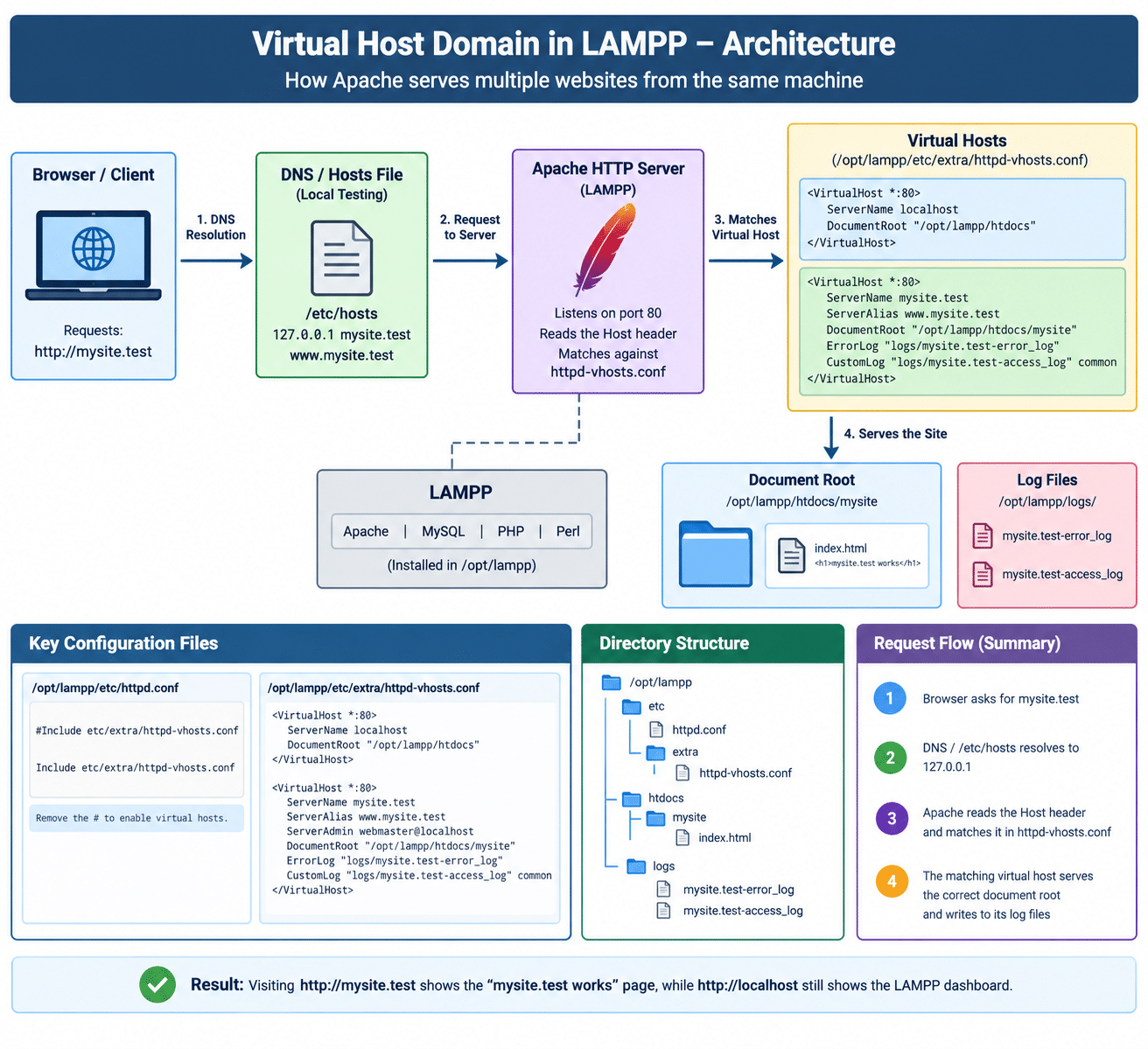
- Your browser asks for a domain name. DNS, or your computer’s
/etc/hostsfile for local testing, turns the name into your server’s IP address - Apache receives the request on port 80 and reads the domain name the browser asked for (the
Hostheader) - It compares that name against the
ServerNameandServerAliasof each virtual host inhttpd-vhosts.conf. This is called a name-based virtual host - The matching virtual host decides which folder is served and which log files are written. If nothing matches, Apache uses the first virtual host listed
The image below shows how a virtual host domain in LAMPP routes a request:
Steps to Set Up a Virtual Host Domain in LAMPP
1. Create the Document Root and a Test Page
sudo mkdir -p /opt/lampp/htdocs/mysite
echo "<h1>mysite.test works</h1>" | sudo tee /opt/lampp/htdocs/mysite/index.html
2. Enable the Virtual Hosts File
Open /opt/lampp/etc/httpd.conf and find this line:
#Include etc/extra/httpd-vhosts.conf
Remove the # so it reads:
Include etc/extra/httpd-vhosts.conf
3. Add the Virtual Host Entries
Open /opt/lampp/etc/extra/httpd-vhosts.conf, creating it if it doesn’t exist. If it already contains sample dummy-host.example.com entries, comment them out or remove them, because they point to folders that probably don’t exist.
To create the virtual host domain in LAMPP, add two entries, with the one for localhost first:
# Keep localhost working: the first virtual host is the default
<VirtualHost *:80>
    ServerName localhost
    DocumentRoot "/opt/lampp/htdocs"
</VirtualHost>

# This is the new virtual host domain in LAMPP
<VirtualHost *:80>
    ServerName mysite.test
    ServerAlias www.mysite.test
    ServerAdmin webmaster@localhost
    DocumentRoot "/opt/lampp/htdocs/mysite"
    ErrorLog "logs/mysite.test-error_log"
    CustomLog "logs/mysite.test-access_log" common
</VirtualHost>
Notes:
- The original had a broken line. It showed
ServerAlias [www.pheonixsolutions.com](https://www.pheonixsolutions.com), a web link pasted into the config, which Apache can’t parse. The correct form is justServerAlias www.yourdomain.com.- Why
localhostgoes first. Once virtual hosts are enabled, the first one becomes the default for every request that doesn’t match. If you only list your new site,http://localhost(and the XAMPP dashboard) will show that site instead.- Using a real domain? Replace
mysite.testwith it, and point the domain’s DNS A record at your server’s IP address. You can then skip Step 4.- Document root outside
htdocs? Apache 2.4 denies access to folders that aren’t explicitly allowed, so you’d get a 403 error. Add a block like this for your folder:<Directory "/path/to/your/site"> Require all granted</Directory>
4. Map the Domain on Your Computer (Local Testing Only)
For a .test name, tell your computer to send it to itself:
echo "127.0.0.1 mysite.test www.mysite.test" | sudo tee -a /etc/hosts
5. Test the Configuration and Restart
Check the syntax of your new virtual host domain in LAMPP first:
sudo /opt/lampp/bin/httpd -t
You should see Syntax OK. If the command complains about the config file path, add -f /opt/lampp/etc/httpd.conf. To see how Apache reads your virtual hosts, run:
sudo /opt/lampp/bin/httpd -S
Then restart:
sudo /opt/lampp/lampp restart
6. Verify in the Browser
To confirm the virtual host domain in LAMPP works, open http://mysite.test/. You should see the “mysite.test works” page. Also check that http://localhost/ still shows the LAMPP dashboard.
Troubleshooting
If your virtual host domain in LAMPP doesn’t work, check these:
- 403 Forbidden: your document root is outside
htdocswithout a<Directory>block, or the Apache user can’t read the folder. Check the folder permissions localhostshows your new site: thelocalhostentry isn’t listed first. Reorder them- The browser says the site can’t be found: the name isn’t resolving. Confirm the
/etc/hostsentry withping mysite.test, or check the DNS record for a real domain - Apache won’t start after your change: run
sudo /opt/lampp/bin/httpd -tand read the error, then check/opt/lampp/logs/error_log - Your changes don’t appear: restart LAMPP, since Apache doesn’t re-read its config on its own
Conclusion
To set up a virtual host domain in LAMPP server, create the folder, remove the # from the Include line in httpd.conf, add the localhost entry first and your new domain after it in httpd-vhosts.conf, map the name in /etc/hosts for local testing, then test and restart. The same XAMPP virtual host method works for as many sites as you like. Keep it to development use, and move to a standard Apache install for anything public.
Frequently Asked Questions
Can I add more than one virtual host domain in LAMPP? Yes. Add another <VirtualHost *:80> block for each site, with its own ServerName, DocumentRoot, and log file names.
Is this the same as an XAMPP virtual host? Yes. LAMPP is the Linux version of XAMPP, and the files and directives are the same. Only the install path differs (/opt/lampp on Linux).
Is it safe to use a virtual host domain in LAMPP for a public site? It isn’t recommended. LAMPP’s defaults are meant for development, so use a hardened Apache install for production.
Why do I need a hosts file entry? For a made-up domain like mysite.test, no DNS record exists, so your computer needs /etc/hosts to know where to send it.
Related Articles
How To Set Up Apache Virtual Hosts on Ubuntu 16.04
How to Create Apache Virtual Hosts in Ubuntu: A Step-by-Step Guide
Talk to Our Technology Experts
Setting up local development environments or hosting multiple websites on one server? Our team can help with Apache and LAMP configuration, web server hardening, and ongoing hosting support, along with custom websites and applications through our Web Development Services.