
Post Date: May 30, 2019
Last Updated: November 02, 2026
Introduction
Python provides several built-in functions and modules to work with dates and times. The datetime module helps developers retrieve the current date and time, extract individual date and time values, and format them according to specific requirements.
Before working with date and time functions, you need to import the required classes from the datetime module.
In this tutorial, we will learn how to import the datetime module, print the current date and time, retrieve the day of the week, and format date and time values using the strftime() method.
Prerequisites
Before getting started, you should have:
- Basic knowledge of Python programming.
- Python installed on your system.
- A code editor or Python IDE.
- Basic understanding of Python functions and modules.
Implementation
Step 1: Import the DateTime Module
Python provides the datetime module to work with dates and times. You can import individual classes depending on your requirements.
Import the date class:
from datetime import date
The date class is used to work with dates, including the year, month, and day.
Import the time class:
from datetime import time
The time class is used to work with time values, including hours, minutes, seconds, and microseconds.
Import the datetime class:
from datetime import datetime
The datetime class combines date and time information and provides methods to retrieve the current date and time.
Step 2: Print Date and Time Using datetime
The datetime.now() method returns the current local date and time.
In the following example, we use the datetime module to retrieve the current date, current time, and day of the week.
Complete Python Code:
from datetime import datetime

def main():

    # Print today's date and time
    todaydate = datetime.now()
    print(todaydate)

    # Get the current time
    current_time = datetime.now().time()
    print("The current time is", current_time)

    # Get the weekday number
    wd = todaydate.weekday()

    # Monday = 0 and Sunday = 6
    days = [
        "Monday",
        "Tuesday",
        "Wednesday",
        "Thursday",
        "Friday",
        "Saturday",
        "Sunday"
    ]

    print("Today is day number %d" % wd)
    print("Which is a " + days[wd])


if __name__ == "__main__":
    main()
Explanation:
datetime.now()retrieves the current local date and time.datetime.now().time()extracts the current time.todaydate.weekday()returns the weekday number.- The weekday numbering starts with Monday as
0and ends with Sunday as6. - The
dayslist contains the weekday names, which are accessed using the returned weekday number. - The
if __name__ == "__main__":statement ensures that themain()function runs when the script is executed directly.
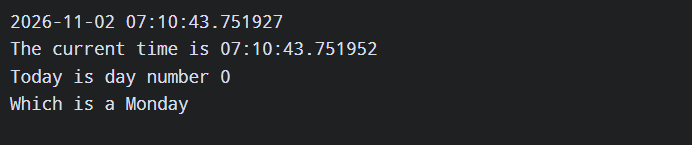
Output:
The output displays the current date, current time, and corresponding weekday. The exact values depend on when you execute the program.
Step 3: Format Date and Time Using strftime()
So far, we have learned how to use the datetime object to retrieve date and time information.
Now, let’s explore the strftime() method, which allows you to format date and time values into readable strings using specific format codes.
The strftime() method converts a date or time object into a formatted string.
Complete Python Code:
from datetime import datetime

def main():

    # Get the current date and time
    now = datetime.now()

    # Display local date and time
    print(now.strftime("%c"))

    # Display local date
    print(now.strftime("%x"))

    # Display local time
    print(now.strftime("%X"))

    # Display time in 12-hour format
    print(now.strftime("%I:%M:%S %p"))

    # Display time in 24-hour format
    print(now.strftime("%H:%M"))


if __name__ == "__main__":
    main()
Explanation of strftime() Format Codes:
%c– Displays the local date and time.%x– Displays the local date.%X– Displays the local time.%I– Represents the hour in 12-hour format.%H– Represents the hour in 24-hour format.%M– Represents minutes.%S– Represents seconds.%p– Displays the local AM or PM indicator.
For example, "%I:%M:%S %p" displays the time in a 12-hour format, while "%H:%M" displays it in a 24-hour format.
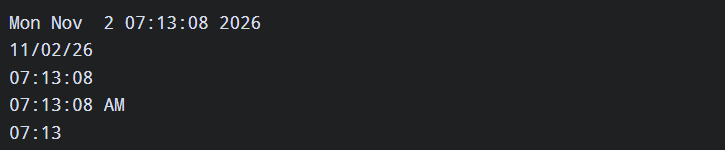
Output:
The program displays the current date and time in different formats. The exact output depends on your system’s local date and time settings.
Conclusion
Python’s datetime module provides useful functionality for working with dates and times. Using methods such as datetime.now() and strftime(), developers can retrieve current date and time values and display them in different formats.
In this tutorial, we covered importing the required datetime classes, retrieving the current date and time, identifying the weekday, and formatting date and time values using strftime().
These functions are useful when developing applications that require date and time handling, timestamps, scheduling, and formatted date displays.
Frequently Asked Questions (FAQ)
1. What is the datetime module in Python?
The datetime module is a built-in Python module used to work with dates and times. It provides classes such as date, time, and datetime.
2. What is the purpose of strftime() in Python?
The strftime() method converts date and time objects into formatted strings using format codes such as %d, %m, %Y, %H, and %M.
3. What is the difference between strftime() and strptime()?
strftime() converts a date or time object into a formatted string, whereas strptime() converts a string into a date or time object based on a specified format.
Related Links
Official Links
Talk to Our Experts
Looking for help with Python development, application development, or automation solutions? Our team can help you explore the right technologies for your business requirements.
Contact our experts: Click here.