Post Date: August 30, 2019
Last Updated: November03, 2026
Introduction
The Can't locate XSLoader.pm in @INC error is a Perl-related issue that can occur on Linux servers running cPanel and WHM. It usually indicates that Perl cannot locate the required XSLoader.pm module within its configured library paths.
The XSLoader module is part of Perl’s core functionality and helps load compiled extensions written in C. If this module is missing, corrupted, or inaccessible, Perl scripts and applications that depend on it may fail to execute.
This issue can also affect server administration tasks, including cPanel operations and EasyApache package installations.
In this guide, we will explain how to identify the missing Perl module, troubleshoot the issue, and resolve the error by reinstalling the required Perl package.
Understanding the XSLoader.pm Error
Perl uses the @INC array to identify directories where it searches for modules.
When a Perl script requires a module, Perl checks these directories to locate the required file. If XSLoader.pm is missing from the expected locations or cannot be accessed, Perl displays an error similar to the following:
Error Message
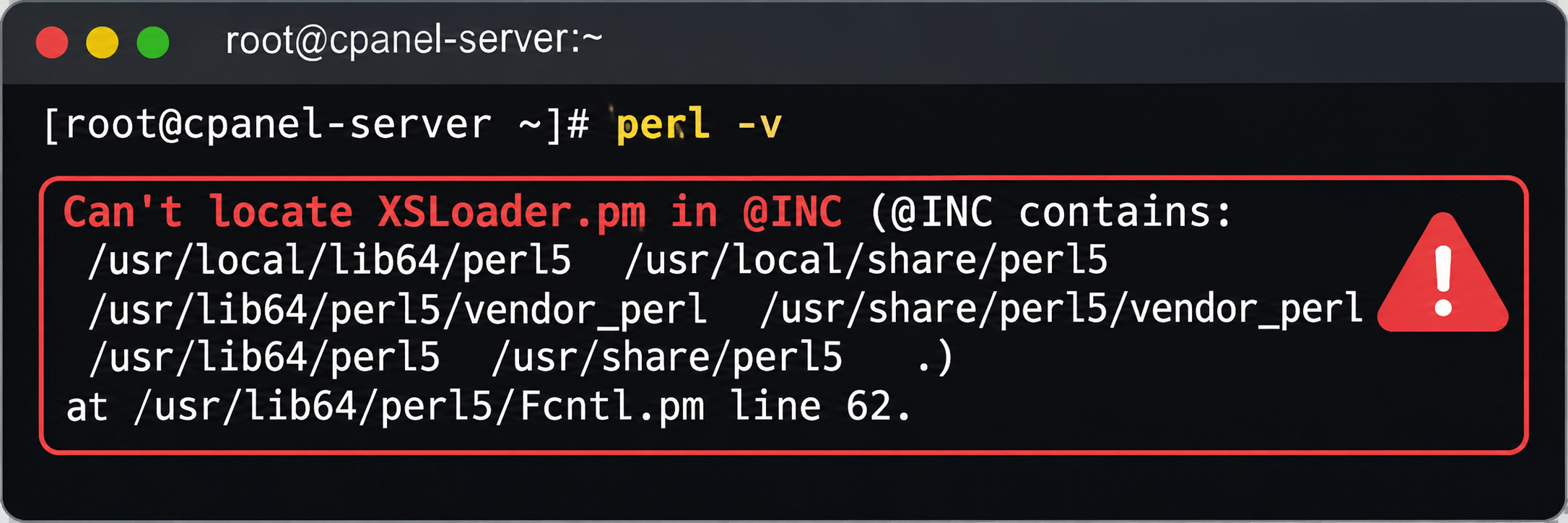
This error indicates that Perl cannot find the XSLoader.pm module while attempting to load the Fcntl.pm module.
Common Causes of the XSLoader.pm Error
The following issues can cause this error on a cPanel server:
- Missing Perl module: The
XSLoader.pmfile may have been accidentally deleted or removed. - Corrupted Perl installation: Perl’s core packages may be incomplete or damaged.
- Incomplete package updates: An interrupted or unsuccessful package installation may leave Perl dependencies in an inconsistent state.
- Incorrect module paths: Perl may not be searching the directory containing the required module.
- Package management issues: RPM or YUM package operations may have caused missing or inconsistent Perl files.
How to Fix the Can’t Locate XSLoader.pm Error
Follow these steps to identify and resolve the missing Perl module.
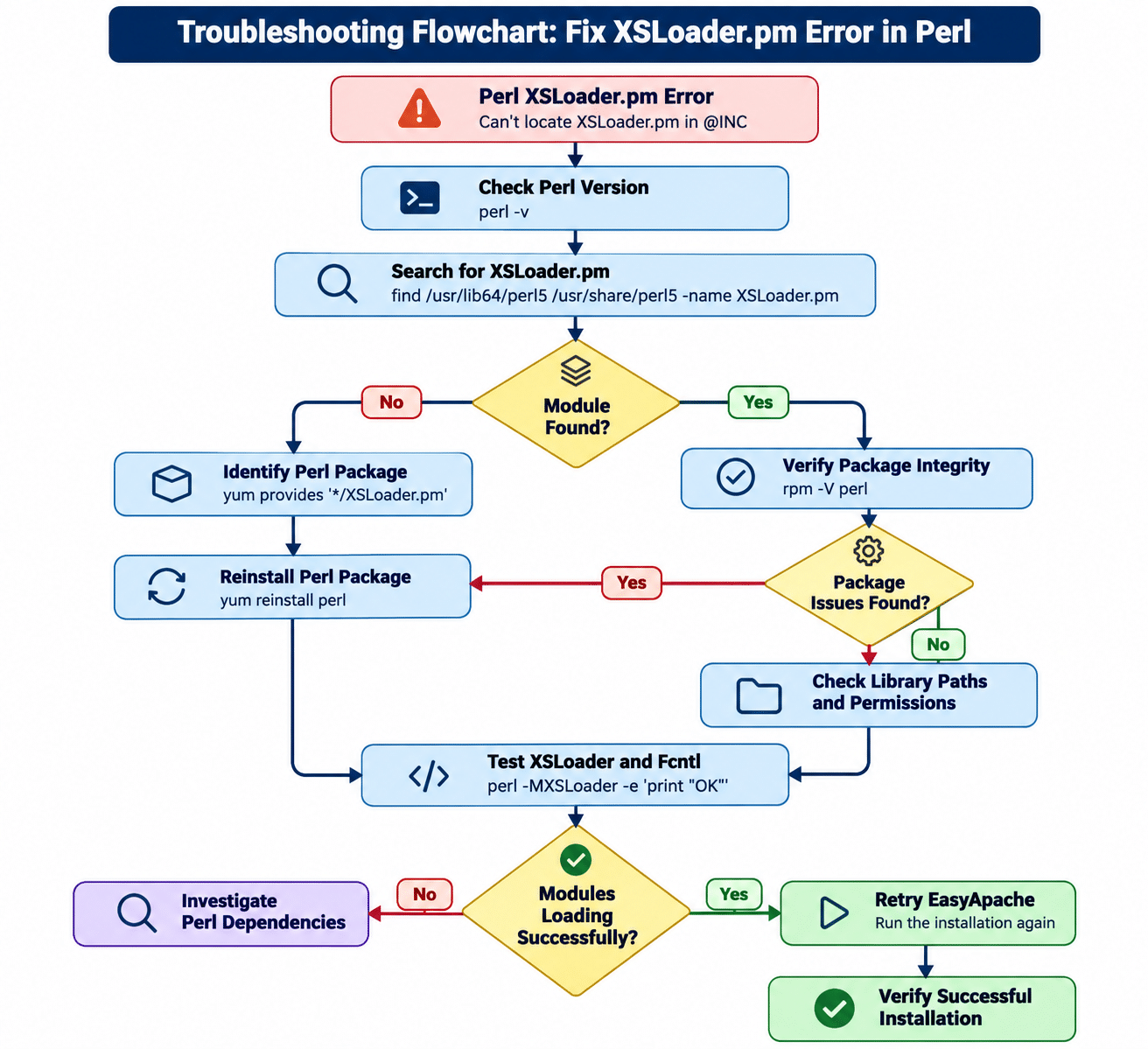
Step 1: Check the Perl Version
First, connect to your cPanel server through SSH with root privileges.
Execute the following command to check the installed Perl version:
perl -v
This command displays the installed Perl version.
If Perl returns the same XSLoader.pm error, continue with the next steps.
Step 2: Check Whether XSLoader.pm Exists
Check whether the required Perl module is available in the standard Perl library directories.
find /usr/lib64/perl5 /usr/share/perl5 \
-name XSLoader.pm 2>/dev/null
If the command does not return any results, the module may be missing from the system Perl installation.
You can also check which package provides the module:
yum provides '*/XSLoader.pm'
This helps identify the package responsible for providing the missing file on YUM-based systems.
Step 3: Verify the Perl Package
Check the installed Perl package version:
rpm -q perl
You can also verify whether the installed Perl package files have been modified or are missing:
rpm -V perl
Review the output to identify any missing or modified package files.
Step 4: Reinstall the Perl Package
In our troubleshooting case, the issue was caused by missing files belonging to the core Perl package.
Reinstalling the Perl package helped restore the missing Perl components.
On CentOS 7 and other compatible YUM-based systems, execute:
yum reinstall perl
If you need to reinstall a specific package version and that version is available in your configured repositories, use:
yum reinstall perl-5.16.3-294.el7_6.x86_64
Important: The above version-specific command is intended for the original CentOS 7 environment. Do not use it on other operating system versions. Check your installed package version and repository availability before proceeding.
Step 5: Verify the Perl Installation
After reinstalling the package, verify that Perl is working correctly.
Execute:
perl -v
Check whether Perl can load the XSLoader module:
perl -MXSLoader -e 'print "XSLoader loaded successfully\n"'
If successful, you should see:
XSLoader loaded successfully
You can also test the Fcntl module:
perl -MFcntl -e 'print "Fcntl loaded successfully\n"'
This confirms that Perl can load the required module and its associated functionality.
Step 6: Retry the cPanel EasyApache Operation
Once Perl is working correctly, retry the EasyApache operation that previously failed.
If you were installing or updating packages through WHM, return to the EasyApache interface and repeat the operation.
Verify that the installation completes without displaying the XSLoader.pm error.
Additional Troubleshooting Tips
If the error continues after reinstalling Perl, consider the following checks:
- Verify that the
XSLoader.pmfile exists in the correct Perl library directory. - Check file permissions and ownership.
- Confirm that the Perl library paths are correct.
- Check for incomplete Perl package installations.
- Review YUM or RPM package installation logs.
- Avoid manually copying Perl core modules from another server, as this can introduce version and compatibility problems.
For cPanel-managed Perl environments, distinguish between the operating system’s Perl installation and cPanel’s bundled Perl installation before modifying packages.
Note: CentOS 7 reached the end of its standard support lifecycle in June 2024. Servers still running CentOS 7 should be evaluated for migration to a supported operating system.
Conclusion
The Can't locate XSLoader.pm in @INC error generally indicates that Perl cannot locate one of its required core modules. Missing or corrupted Perl package files can prevent Perl scripts and dependent applications from working correctly.
In our troubleshooting case, reinstalling the Perl package restored the missing components and resolved the issue.
Before reinstalling Perl, verify the installed package version, check the module location, and confirm the operating system compatibility. These checks help prevent unnecessary changes to the server’s Perl environment.
Keeping Perl packages properly maintained is important for reliable cPanel operations and successful EasyApache installations.
Frequently Asked Questions (FAQs)
1. What does Can’t locate XSLoader.pm in @INC mean?
This error means Perl cannot find the XSLoader.pm module in any of the directories listed in its @INC library search path.
2. What is the purpose of XSLoader.pm in Perl?
XSLoader.pm is a core Perl module used to load compiled extensions written in C. It allows Perl modules to access compiled native functionality.
3. How do I check whether XSLoader.pm is installed?
Run the following command to search for the module:
find /usr/lib64/perl5 /usr/share/perl5 \
-name XSLoader.pm 2>/dev/null
You can also use YUM to identify the package that provides it:
yum provides '*/XSLoader.pm'
4. How do I reinstall Perl on a cPanel server?
On compatible YUM-based systems, execute the following command with root privileges:
yum reinstall perl
Make sure the package matches your operating system and installed Perl version.
5. Can the XSLoader.pm error affect EasyApache installations?
Yes. If an EasyApache operation depends on Perl scripts or modules that cannot load correctly, the missing module may cause installation or update operations to fail.
6. Does reinstalling Perl delete my cPanel websites or databases?
Reinstalling the operating system’s Perl package is not intended to delete website files or databases. However, package changes can affect system scripts and dependencies. Always take an appropriate server backup or snapshot before modifying core packages.
7. How can I verify that the XSLoader.pm issue is fixed?
Run the following command:
perl -MXSLoader -e 'print "XSLoader loaded successfully\n"'
If the command completes successfully, Perl can load the module.
Related Articles
Migrate Gsuite mail accounts to cPanel
cPanel Moodle migration to Bitnami stack
Talk to Our cPanel Experts
Need help with cPanel configuration, WHM administration, Perl errors, or EasyApache troubleshooting?
Pheonix Solutions provides reliable cPanel server management, Linux administration, and hosting support to keep your infrastructure secure and running smoothly.
Explore our DevOps and Cloud Services or Contact our Experts for assistance.